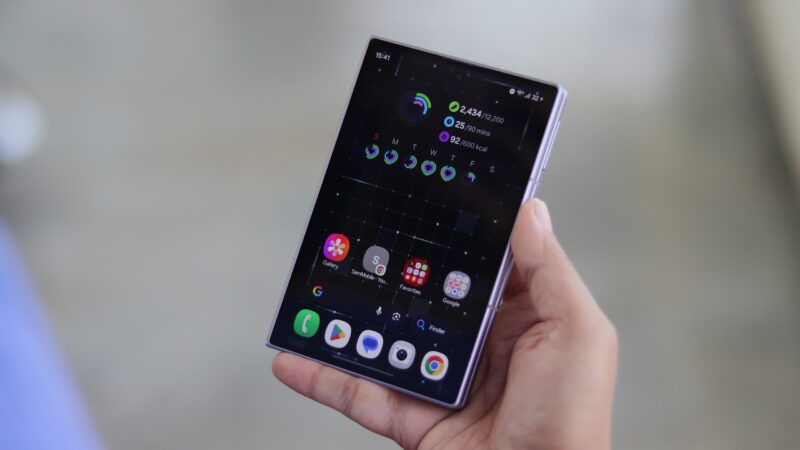
The Galaxy Z Fold 8 has captured more attention than most phones manage. Its fresh new form factor has been turning heads even among people who don’t follow phones closely, and that could translate into strong sales.
But what’s it like to live with once the initial excitement has faded, and does it justify the $1,899 price tag?
With additional testing and input from Daniel Scuteri.
Design
Abhijeet Mishra / SamMobile
Samsung Galaxy Z Fold 8
The Galaxy Z Fold 8 weighs just 201 grams, and that really helps sell this form factor. The low weight makes it easier to buy into how compact the phone is, and considering it’s a phone and a tablet in one, that’s quite remarkable.
The phone feels great to hold when it’s closed. Most smartphones have stretched-out, elongated designs, so there’s something refreshing about holding something this small and compact.
It’s also extremely comfortable in a pocket. It doesn’t take up much space, and taking it out and unfolding it never stops being satisfying.
The Galaxy Z Fold 8 weighs just 201 grams, and that really helps sell this form factor. Its low weight makes it easier to buy into the compact nature of the device.
The Galaxy Z Fold 8 is somewhat reminiscent of the Galaxy S25 Edge from last year, except it’s a lot more practical. The S25 Edge was just a thin and light conventional smartphone, while the Fold 8 is a thin, light, and compact phone that unfolds into a tablet.
Abhijeet Mishra / SamMobile
Samsung Galaxy Z Fold 8
Abhijeet Mishra / SamMobile
Galaxy Z Fold 8
Abhijeet Mishra / SamMobile
Samsung Galaxy Z Fold 8
The shorter body does create a few issues. When you open the camera while the phone is folded, your finger can show up in the viewfinder, so you have to reposition it before taking the photo.
Abhijeet Mishra / SamMobile
Galaxy Z Fold 8
The same goes for the LED flash. It sits very close to where most people naturally rest a finger while holding the phone, and even if your finger doesn’t show up in the frame, it can block some of the light and give the photo a reddish haze.
These aren’t deal-breakers, though. It only takes a few days to adjust your grip and get used to the phone’s quirks.
Cover display
Abhijeet Mishra / SamMobile
Galaxy Z Fold 8's cover display
The Galaxy Z Fold 8 has a 5.5-inch cover display with a 16:10 aspect ratio. It almost feels like something from another time, minus the unsightly bezels.
Content looks good on it, although it depends on the app. Facebook uses the display well, while Instagram doesn’t take full advantage of it when showing Reels. Regular scrolling through the Instagram feed fits the display nicely, though.
Abhijeet Mishra / SamMobile
Instagram reels on Galaxy Z Fold 8 cover display
YouTube also works well here. The 16:10 aspect ratio lets videos fill the screen nicely, and you might be surprised by how often you end up watching videos on the cover screen.
The 16:10 aspect ratio allows videos to fill the screen nicely, and you may be surprised by how often you end up using the cover display to watch videos.
The cover display makes sense because it’s reminiscent of what Samsung was going for with the original Galaxy Fold in 2019. Samsung wants you to have a reason to unfold the phone and use the much larger inner display. In the Fold 8’s case, though, the cover screen is highly usable on its own too.
Abhijeet Mishra / SamMobile
Galaxy Z Fold 8
Abhijeet Mishra / SamMobile
Galaxy Z Fold 8
Abhijeet Mishra / SamMobile
Samsung Galaxy Z Fold 8
It’s fine for pretty much anything you do day to day, including typing and getting around the interface. But typing, working, and watching content on the inner display is where the real fun begins.
Hinge and Flex Mode
You have to unfold the phone first to reach the inner display. Samsung has redesigned the hinge, and opening the Fold 8 feels easy and smooth.
Abhijeet Mishra / SamMobile
Samsung Galaxy Z Fold 8
The hinge never puts up enough resistance to make you worry about damaging the phone. Previous models weren’t necessarily at risk of breaking either, but the Galaxy Z Fold 8 feels like it’s meant to be opened. The opening motion is smooth from beginning to end.
Samsung has redesigned the hinge, and opening the Fold 8 feels easy and smooth.
The downside of this hinge design is the lack of Flex Mode. Samsung hasn’t included any resistance in the later stages of the hinge’s movement, so once the phone reaches a certain angle, it just falls into the fully open position.
That means it can’t stay open at multiple angles, and the Flex Mode software features aren’t supported either. It’s annoying and feels like a missed opportunity. If you really want Flex Mode, you’ll have to go for the more expensive Galaxy Z Fold 8 Ultra instead.
Abhijeet Mishra / SamMobile
Galaxy Z Fold 8
The Galaxy Z Fold 8 does support what you could call tent mode, which is a workaround for watching content while you do something else. You can also unfold it to just under a 90-degree angle and play videos on the cover screen. Without Flex Mode, though, there’s no practical way to take hands-free photos or videos.
Foldable display
Abhijeet Mishra / SamMobile
Samsung Galaxy Z Fold 8
The inner display is what sells the Galaxy Z Fold 8. Nobody’s going to buy this phone just for its cover screen. The promise of a bigger, more immersive experience is the main reason to pick it.
The 7.6-inch inner display has a 4:3 aspect ratio and gives the phone a true mini-tablet form factor. It feels particularly well suited to productivity.
The 7.6-inch inner display has a 4:3 aspect ratio and gives the phone a true mini-tablet form factor.
You can take notes side by side in Samsung Notes, scroll through existing notes, and make good use of the space. The side-by-side layout fills the display nicely.
Abhijeet Mishra / SamMobile
Galaxy Z Fold 8
Above all, watching content is excellent. When it’s unfolded, content shows up at roughly the same size as it does on the Galaxy Z Fold 7. The difference is that you have to rotate the Fold 7 to get that layout, while the Galaxy Z Fold 8 opens straight into it.
It still feels more immersive than the Fold 7, though, because there’s less phone to hold, it’s lighter, and the black bars above and below the content are smaller.
Abhijeet Mishra / SamMobile
Galaxy Z Fold 8
There’s also something special about rotating the unfolded phone into portrait and reading on it. It’s one of those things that’s hard to describe until you’ve held the phone yourself.
There are, once again, a few quirks to get used to. It’s great that the phone opens straight into a tablet-like layout for watching content, but you pretty much have to rotate it to portrait for apps like Instagram and X, since their feeds don’t fit properly on the display in landscape.
While it is great that the phone opens directly into a tablet-like layout for watching content, rotating it to portrait orientation is almost essential for apps such as Instagram and X, as their feeds do not fit properly on the display in landscape mode.
The same goes for viewing photos in the Gallery app. If you usually shoot in portrait, you’ll need to rotate the unfolded phone to portrait as well for those images to fill the screen.
Abhijeet Mishra / SamMobile
Galaxy Z Fold 8
In practice, that means you often have to rotate the phone after unfolding it, depending on what you’re doing. Like adjusting your grip to avoid blocking the camera, it’s not a deal-breaker, but it’s still worth pointing out.
The shorter, more compact form factor can also make some apps feel cramped in landscape, because there’s less vertical space to work with. YouTube is a good example. At the default scaling, only two full video thumbnails fit on the screen, so you have to scroll more to see additional suggestions.
Abhijeet Mishra / SamMobile
Galaxy Z Fold 8
Thankfully, Samsung saw this coming. The Fold 8 has an App zoom setting you can adjust separately for each app to control how much of its interface fits on the display.
At the smallest App zoom setting, YouTube shows six video thumbnails at once. In X, it fits a post’s text and media without any extra scrolling, and it can even show a lengthy Community Note in full, depending on the aspect ratio of the post’s image or video. Instagram, however, doesn’t benefit from the setting at all.
Display technology
Abhijeet Mishra / SamMobile
Galaxy Z Fold 8
Samsung has placed a titanium-alloy film and a titanium plate underneath the foldable display. That strengthens the overall structure and helps make the crease less visible.
The crease hasn’t disappeared completely, but it’s far less noticeable than on previous Fold models. You can also feel it less when moving a finger across the screen. It remains to be seen how well that holds up over time, but out of the box, the crease is a non-issue.
The crease hasn’t disappeared completely, but it’s far less noticeable than on previous Fold models.
The foldable display also has an anti-reflective coating that can reduce glare and reflections by up to 50%, according to Samsung. That’s another thing that helps make the crease less noticeable. The coating is just as effective here as it is on the Galaxy S26 Ultra, which is to say it works very well.
Abhijeet Mishra / SamMobile
Now Brief on the Galaxy Z Fold 8
The cover display doesn’t get the same anti-reflective treatment, but both screens now reach a peak brightness of 3,000 nits. These are the brightest displays Samsung has ever used on a smartphone, and while legibility outdoors and around strong light sources was never an issue on the Fold 7’s 2,600-nit displays, that’s even more of a guarantee here.
Audio quality
Abhijeet Mishra / SamMobile
Galaxy Z Fold 8
Samsung’s Galaxy Z Fold smartphones have featured two dedicated speakers for true stereo sound since the first model. That setup delivered excellent audio quality, at least until the Galaxy Z Fold 7 came along.
The Fold 7’s ultra-thin body hurt speaker quality. Previous Fold models justified two dedicated speakers by delivering rich, powerful stereo sound, but that advantage was largely lost on the Fold 7.
Things are better on the Galaxy Z Fold 8. Since it isn’t as thin as the Fold 7, the speakers sound fuller and deeper, even if they aren’t always louder. They still don’t sound as good as the ones on the Fold 5 or Fold 6, though, or even Samsung’s Galaxy S flagships, which use just one dedicated speaker alongside the earpiece.
There have been some complaints online about the speaker orientation. When the phone is unfolded in landscape, both speakers sit at the top and bottom of the left half of the phone. As a result, it can sometimes feel like the sound is only reaching one ear while you’re watching videos.
Some people will dislike this arrangement, and others won’t notice it at all. Here at SamMobile, opinions are split. Either way, headphones or earbuds are still the better option if audio quality matters to you.
S Pen
Abhijeet Mishra / SamMobile
Galaxy Z Fold 8
Those buying their first Samsung foldable may not even realize that certain features are missing. They can simply enjoy everything the Galaxy Z Fold 8 offers.
Existing Galaxy Z Fold users, however, will notice those omissions. The biggest thing missing from the Galaxy Z Fold 8 is S Pen support. The Galaxy Z Fold Special Edition didn’t have it, the Fold 7 didn’t have it, and the Fold 8 continues that disappointing trend.
It’s unfortunate, because the large, open canvas, especially in portrait orientation, would have been perfect for creative work and productivity. Samsung has said it hasn’t ruled out bringing the S Pen back to the Fold series, but for now, it’s not available on Samsung’s latest foldables.
Cameras
Abhijeet Mishra / SamMobile
Galaxy Z Fold 8
The cameras are one area where a lot of people will see the Galaxy Z Fold 8 as a step down. There are two 50MP rear cameras (wide and ultrawide), along with 10MP selfie cameras on the cover and foldable screens. It’s not as inspiring a setup as the one on the Galaxy S26 Ultra or even the Galaxy Z Fold 7.
Both rear cameras are still capable, though, and can produce good results in a lot of situations. Outdoors in daylight, the main camera captures plenty of detail, has a wide dynamic range, and produces colors that stay fairly close to real life.
Max Jambor
1x (main camera)
Max Jambor
1x
Max Jambor
1x
Max Jambor
1x
Max Jambor
1x
Abhijeet Mishra
1x
Abhijeet Mishra
1x
Max Jambor
1x
Abhijeet Mishra
1x
Abhijeet Mishra
1x
Abhijeet Mishra
1x
Abhijeet Mishra
1x
Abhijeet Mishra
1x
Abhijeet Mishra
1x
Max Jambor
1x
Abhijeet Mishra
1x
Indoor performance is good when there’s enough ambient light, though sharpness and detail leave something to be desired. Low-light photos also lack detail, and blur can become an issue when the subject isn’t standing perfectly still.
Abhijeet Mishra
Portrait shot
Abhijeet Mishra
Portrait
Abhijeet Mishra
Portrait
Abhijeet Mishra
Portrait
Abhijeet Mishra
Portrait
Abhijeet Mishra
Portrait
Abhijeet Mishra
Portrait
Abhijeet Mishra
Portrait
The ultrawide camera is the best Samsung has used on a foldable so far. Daylight performance is strong, with plenty of detail. It does a good job indoors too, especially when the automatic Night mode kicks in. Like the Fold 7, the Fold 8’s ultrawide camera supports autofocus, so you can take macro shots, which now capture slightly more detail.
Max Jambor
0.6x (ultrawide)
Max Jambor
1x (main camera)
Max Jambor
0.6x
Max Jambor
1x
Max Jambor
0.6x
Abhijeet Mishra
1x
Abhijeet Mishra
0.6x
Abhijeet Mishra
1x
Max Jambor
0.6x
Max Jambor
1x
Max Jambor
0.6x
Max Jambor
1x
Max Jambor
0.6x
Max Jambor
1x
Abhijeet Mishra
0.6x
Abhijeet Mishra
1x
Video quality is excellent on both rear cameras. The front and rear cameras can all record at 4K 60 fps, and you can switch between them while recording. For the first time on a foldable Galaxy phone, the ultrawide camera supports 8K recording, made possible by its 50MP resolution.
The ultrawide camera is the best Samsung has used on a foldable so far.
The Galaxy Z Fold 8 also supports recording videos using Samsung’s APV video codec, which retain more detail even after multiple rounds of editing. The trade-off is that APV videos take up a lot of storage space. On the Galaxy S26 series, APV support is exclusive to the Ultra model, but Samsung has included it on both Fold 8 models.
The usual foldable camera features are included as well. Rear Cam Selfie lets you take selfies with the rear cameras, and the results are very good.
There’s also Cover Screen Preview, which is especially useful when you’re photographing children, since they can look at themselves on the cover screen while you take the photo.
Of course, the Fold 8’s camera setup is missing something important: a zoom lens. The 3x telephoto camera on Samsung’s previous foldables and the Fold 8 Ultra isn’t particularly impressive, but it’s still better than having no dedicated zoom camera at all.
So the Fold 8 is stuck with digital zoom, and the results are only really good up to 4x. Photos taken at higher zoom levels can look fine at times, but Samsung leans heavily on post-processing to make them usable, which can make them look artificial.
Max Jambor
Selfie shot on Galaxy Z Fold 8
Max Jambor
Selfie
Abhijeet Mishra
Selfie
Abhijeet Mishra
Selfie
Abhijeet Mishra
Selfie
As for the selfie cameras, the one inside the foldable display has a wider field of view, similar to the Fold 7. Image quality from both is pretty good, with plenty of detail, a wide dynamic range, and natural-looking skin tones.
Performance
Abhijeet Mishra / SamMobile
Gaming on Galaxy Z Fold 8
Performance on the Galaxy Z Fold 8 is excellent. It uses the same Snapdragon 8 Elite Gen 5 ‘For Galaxy’ chip as the Galaxy S26 series and the Galaxy Z Fold 8 Ultra, and at no point does the phone slow down during daily use. General performance is every bit as good as you’d expect from a Samsung flagship.
General performance is every bit as good as you’d expect from a Samsung flagship.
The smaller form factor might raise concerns about heat and throttling, but neither is an issue in regular use. Gaming performance is fantastic too. The phone does get a little warm during longer sessions, but never uncomfortably so.
There’s some throttling when you play demanding games for long stretches, though that’s to be expected from such a powerful chip in a compact foldable.
The Galaxy Z Fold 8 runs One UI 9, based on Android 17, out of the box. It delivers the usual solid software experience Samsung fans have come to expect.
The experience isn’t much different from the One UI 9 beta on the Galaxy S26 series, and the video below is a good starting point for seeing what to expect.
The wider display makes three-app multitasking more useful.
The wider display also makes three-app multitasking more useful. Unlike the Fold 8 Ultra and previous Fold models, the Fold 8 doesn’t limit you to one app on half the screen with the other half split between two apps. You can have all three apps open side by side at the same time.
Abhijeet Mishra / SamMobile
Three-app multitasking on Galaxy Z Fold 8
It’s not quite like placing three standard phone displays next to each other, but it’s still something no other Samsung foldable offers, apart from the Galaxy Z TriFold.
On the Galaxy AI side, Samsung has added a neat new feature called My FanCam. If you have a recorded video with multiple people in it, My FanCam can track one of them and create a new clip that keeps that person front and center, cropping out everything else.
For example, you can take a long, wide video of a football match, pick out one player, and turn that footage into a clip that’s ready for social media. The tracking works particularly well during actions such as nutmegging another player or taking a shot at the goal, and My FanCam follows the player throughout the move.
Like other flagship Galaxy devices launched over the last two years, the Galaxy Z Fold 8 will receive seven generations of Android OS upgrades and seven years of security updates. This is the best software support available in the Android ecosystem and helps justify the phone’s high asking price.
Battery and charging
Abhijeet Mishra / SamMobile
Galaxy Z Fold 8
The Galaxy Z Fold 8’s 4,800mAh battery isn’t the biggest Samsung has put in a foldable. That honor goes to the Galaxy Z TriFold and its 5,600mAh battery, followed by the Galaxy Z Fold 8 Ultra with its 5,000mAh unit.
It is around 10% larger, though, than the battery in every other Fold going back to the Galaxy Z Fold 3. Samsung managed to fit it inside this compact body by finally switching to silicon-carbon battery technology.
The Fold 8 can get through a full day fairly comfortably, even with a few hours of mobile data use. A day and a half is possible as well if you mostly stick to the cover screen and avoid too many demanding tasks such as photography and gaming.
The Fold 8 can get through a full day fairly comfortably, even with a few hours of mobile data use.
Battery life isn’t the best available on a flagship Samsung smartphone. For that, you’ll need a Galaxy S25 Ultra or Galaxy S26 Ultra. But it’s dependable and consistent, and only the most demanding users will need a top-up before the end of the day.
Speaking of topping it up, the Galaxy Z Fold 8 supports 45W wired and 20W wireless charging. Let’s get the wireless side out of the way first: the Fold 8 didn’t play well with the one third-party charger that we tested, even though the same charger works properly with the Galaxy S26 Ultra and Galaxy Z Fold 8 Ultra.
The Fold 8 never seemed to hit even 15W, and it estimated 3.5 hours for a full charge. For comparison, a Galaxy S25 Ultra and its 5,000mAh battery shows an estimate of 2 hours and 10 minutes at 15W, so the Fold 8 is clearly drawing less than that.
The third-party magnetic case we used doesn’t seem to be the problem, since the same manufacturer’s case for the Galaxy Z Fold 8 Ultra works as intended. The Fold 8 Ultra even seems to charge at 25W despite Samsung listing 20W, so it’s unclear what’s going on here.
Either way, wired is what you may have to depend on, and it’s fast. Samsung says the battery charges to 63% in 30 minutes, and that’s an accurate estimate. An hour gets you to nearly 95%, and a full charge takes a little under 70 minutes.
Verdict
Abhijeet Mishra / SamMobile
Galaxy Z Fold 8
A lot of what makes the Galaxy Z Fold 8 appealing comes down to small everyday things. You rotate the unfolded phone into portrait and read something on it, or you put it in tent mode and watch content while you get some work done, or you just slide it into a pocket and pull it back out again, because it sits so comfortably and doesn’t take up much space.
The Fold 8 is simply addictive to use. That might sound like a bad thing, but it’s a sign Samsung has done a good job here.
Trying the phone before you buy it may not be easy, and at $1,899 (€1,999 / INR 1,79,990), it isn’t cheap. But it’s one of those products you probably won’t regret once you’ve used it.
The Fold 8 is simply addictive to use. That might sound like a bad thing, but it’s a sign Samsung has done a good job here.
If this is your first Samsung foldable, you may not even notice the missing S Pen, Flex Mode, and telephoto camera, and you’ll just get to enjoy everything the phone does offer. Existing Fold users are far more likely to miss those features.
Those are the Galaxy Z Fold 8’s main drawbacks. The best you can do is appreciate what this new form factor offers and hope Samsung finds a way to bring the missing features to the Galaxy Z Fold 9 next year.
The Galaxy Z Fold 8 isn’t perfect, but it’s compact, light, practical, and extremely enjoyable to use. Shortcomings and all, it’s a phone you will not want to put down.












 Apple has no answer to the Galaxy Z Fold 8 Ultra, and Samsung should pounce on it
 Meta just showed Samsung what Galaxy Glasses don't need to become
 Mirror view missing from the Galaxy Z Fold 8 feels like another weird Samsung omission
 iPhone Duo hype proves Samsung was right about foldables all along
 I'm going on holiday, and my Galaxy Z Fold 8 isn't coming with me
 Apple's Siri AI troubles prove Samsung's messy multi-AI strategy was right
 Apple just showed Samsung what foldable buyers care about
 7 years of foldables and my Galaxy Z Fold 8 still can't count screen usage properly
 The Galaxy Z Fold 8 may hold the answer to the only viable compact phone formula