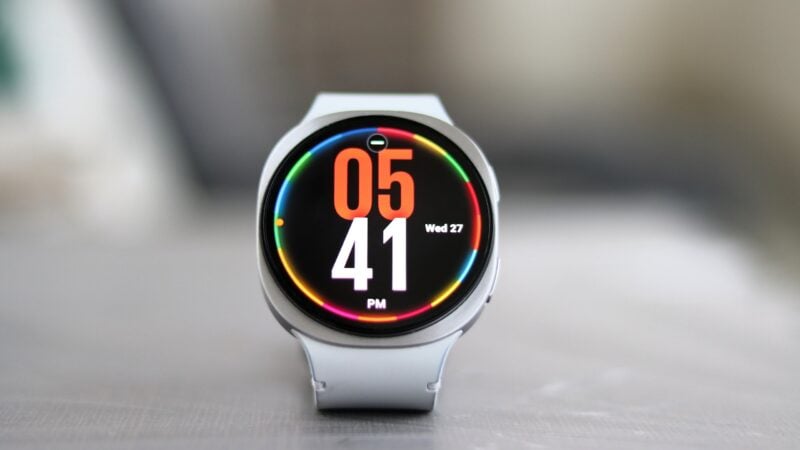
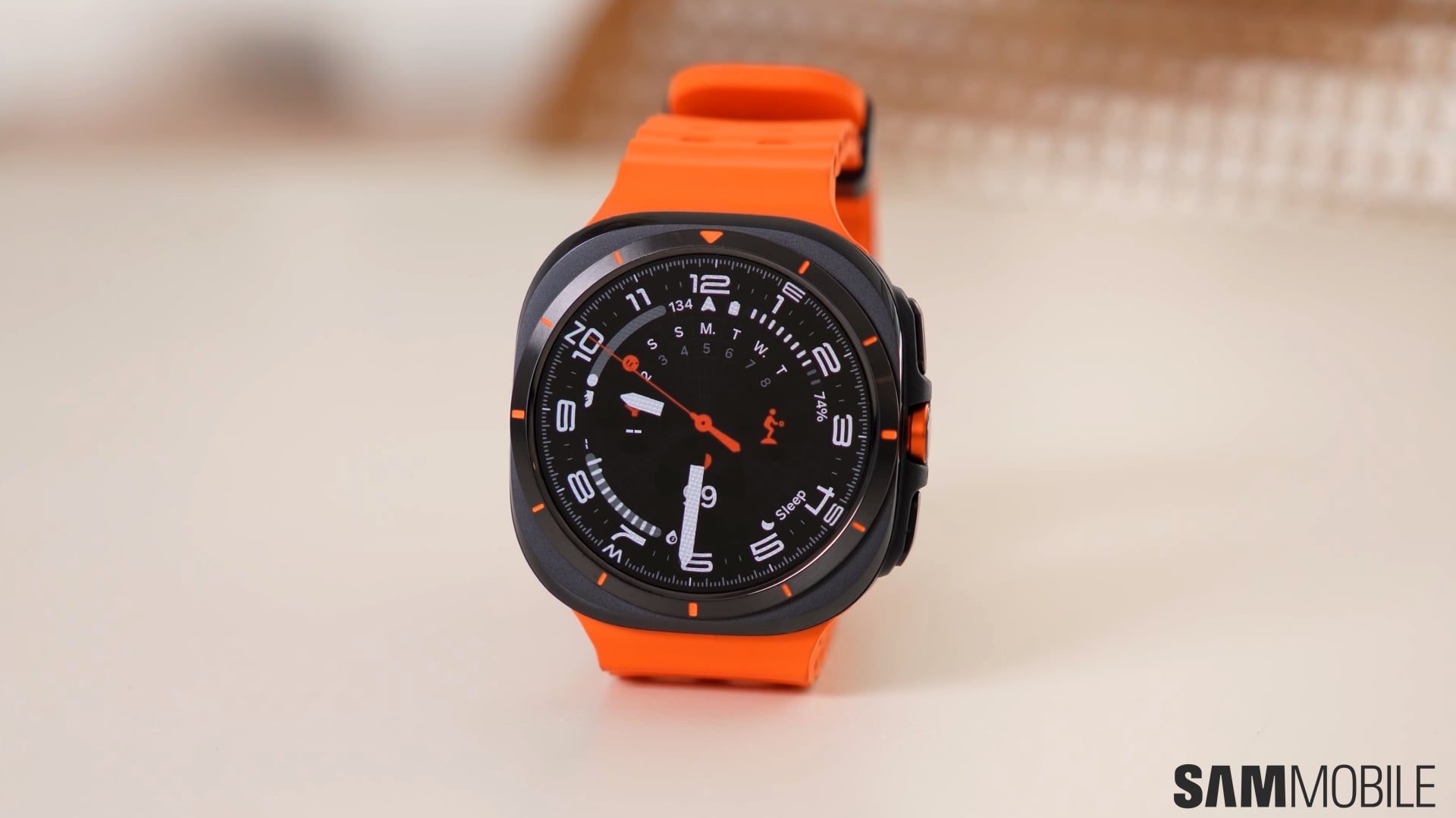
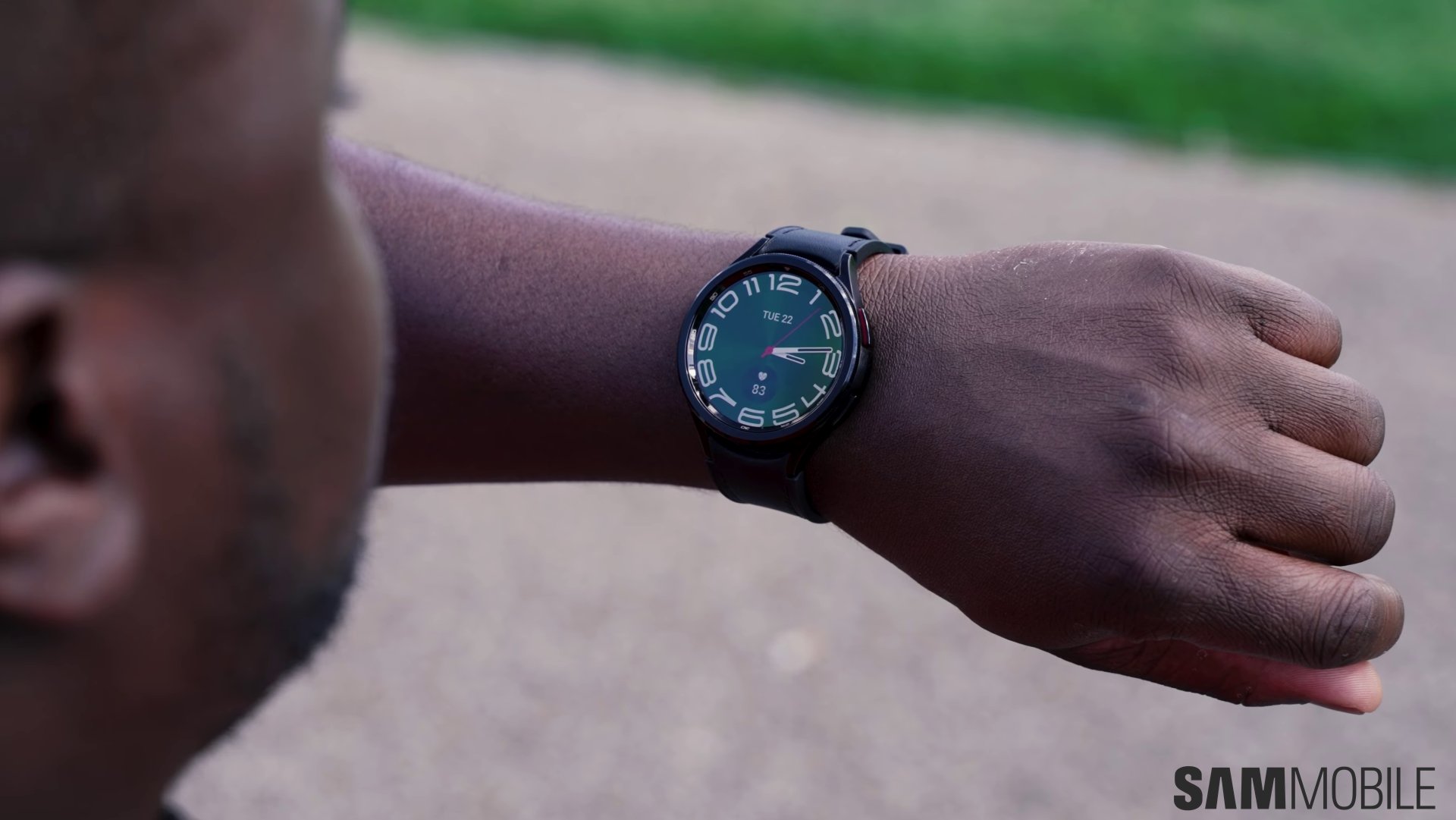
The original Galaxy Watch Ultra was Samsung’s most ambitious smartwatch ever. It combined a durable titanium case with extensive health tracking, Wear OS, LTE connectivity, and features designed for athletes and outdoor enthusiasts.
But it didn’t always feel as refined as its premium price suggested.
The watch was bulky, charging was painfully slow, and its battery life wasn’t dramatically better than that of Samsung’s more conventional smartwatches. It was a powerful device, but not necessarily one that felt comfortable enough to wear around the clock.
The Galaxy Watch Ultra 2 is Samsung’s attempt to fix those shortcomings without abandoning the design and identity of the original model.
It has a thinner case, a larger and much brighter display, a significantly bigger battery, and Qualcomm’s latest wearable chipset. Samsung has also improved the accompanying Marine Band, added more serious outdoor features, and introduced new ways to interact with Google Gemini.
These changes make the Galaxy Watch Ultra 2 a much better smartwatch than its predecessor. But is the €749 / $699 price tag justified?
Design
Max Jambor / SamMobile
Galaxy Watch Ultra 2
Samsung hasn’t reinvented the Galaxy Watch Ultra’s appearance. The second-generation model still combines a circular display with a cushion-shaped titanium case, giving it a look that stands apart from the standard Galaxy Watch lineup.
I already liked the appearance of the first Galaxy Watch Ultra, so I’m glad Samsung didn’t start from scratch. Instead, the company refined the existing design.
The transition between the screen, bezel, and surrounding case looks smoother, while the redesigned buttons give the watch a cleaner and more premium appearance. It still looks rugged, but it no longer feels quite as bulky or industrial.
Max Jambor / SamMobile
Galaxy Watch Ultra 2
Max Jambor / SamMobile
Galaxy Watch Ultra 2
Max Jambor / SamMobile
Galaxy Watch Ultra 2
The biggest design improvement isn’t immediately obvious in photos. Samsung has made the case around 12% thinner despite increasing the battery capacity by 35%. That difference becomes noticeable as soon as you put the watch on.
Samsung has made the case around 12% thinner despite increasing the battery capacity by 35%.
The Galaxy Watch Ultra 2 sits closer to the wrist and doesn’t move around as much during everyday use or exercise. It feels less cumbersome than the original model and is considerably more comfortable to wear for long periods.
Curiously, the new model isn’t actually lighter. It weighs 61.5 grams, making it around one gram heavier than its predecessor. But that number doesn’t tell the full story.
The redesigned Marine Band is around 26% lighter and feels much more flexible. It conforms to the wrist instead of making the entire watch feel stiff and top-heavy.
Max Jambor / SamMobile
Galaxy Watch Ultra 2 band
The material also works well during exercise. It doesn’t absorb sweat, it can be cleaned easily, and the openings throughout the band improve ventilation. I didn’t notice any unpleasant smells developing after workouts either.
Most importantly, I could comfortably wear the Galaxy Watch Ultra 2 while sleeping. The original model often felt too bulky at night, whereas the slimmer case and improved band make the new version much easier to forget about.
I could comfortably wear the Galaxy Watch Ultra 2 while sleeping.
Build quality is as good as you would expect from a premium Samsung smartwatch. The titanium case feels solid, the buttons have satisfying feedback, and the quick-release mechanism makes changing bands effortless.
Samsung continues to use its own band connector, though, so standard watch straps are not compatible.
Abhijeet Mishra / SamMobile
Galaxy Watch Ultra 2
The Galaxy Watch Ultra 2 is rated for 10 ATM water resistance and meets the MIL-STD-810H durability standard. Samsung has also upgraded it from IP68 to IP69K protection. It is now certified according to the EN13319 standard as well, allowing the watch to function as a diving instrument and record dives down to 40 meters.
Display
Max Jambor / SamMobile
Galaxy Watch Ultra 2
The Galaxy Watch Ultra 2 has a 1.52-inch Super AMOLED display with a claimed peak brightness of 5,000 nits. That is a substantial increase over the 3,000-nit panel used by the original Galaxy Watch Ultra.
Peak brightness figures don’t always translate into a meaningful real-world improvement. In this case, however, they do. The new display is remarkably easy to read outdoors.
The new display is remarkably easy to read outdoors.
Even under direct sunlight, I had no trouble checking notifications, reading navigation instructions, or viewing workout information.
That is particularly useful on a watch designed for running, cycling, hiking, and other activities where you don’t want to stop and shield the screen with your hand.
The slightly larger panel also allows Samsung to show more information at once. The difference isn’t dramatic when navigating menus, but it becomes more obvious when using detailed watch faces.
Max Jambor / SamMobile
Galaxy Watch Ultra 2
Max Jambor / SamMobile
Galaxy Watch Ultra 2
You can display the weather, heart rate, activity progress, battery level, and other complications without making the screen feel overly crowded. For a smartwatch that is meant to provide quick information during exercise, that additional space is valuable.
Colors are vibrant, contrast is excellent, and text looks sharp. This is easily one of the Galaxy Watch Ultra 2’s best upgrades. The display is also protected by sapphire crystal, and neither the screen nor the case developed any noticeable scratches during my time with the watch.
Quick Button
Max Jambor / SamMobile
Samsung Galaxy Watch Ultra 2
The orange Quick Button returns on the right side of the case. It can be configured to launch a workout, open an app, activate the flashlight, or perform another supported shortcut.
I primarily used it to start strength training sessions at the gym.
Without the button, I would have to open Samsung Health or scroll through the watch’s tiles to find the workout menu. With the Quick Button configured, I could start tracking almost immediately. It sounds like a small convenience, but it makes the watch considerably more pleasant to use when exercising regularly.
The button can also perform different actions while a workout is active. Depending on the selected activity, it can switch between information screens or mark workout segments. Holding the button activates the emergency siren. It is extremely loud and could help others locate you during an emergency while hiking or exercising outdoors.
Samsung still hasn’t added a physical rotating bezel, and the Quick Button itself can’t be rotated. That feels like a missed opportunity.
A physical control would make the watch easier to operate with wet hands, while wearing gloves, or underwater. The touch-sensitive bezel works well in normal conditions, but it is not a perfect substitute for a proper rotating control.
Fitness tracking
Max Jambor / SamMobile
Galaxy Watch Ultra 2
The Galaxy Watch Ultra 2 supports a huge number of exercises, ranging from walking, running, and cycling to swimming and strength training.
Samsung has also expanded its features for serious outdoor activities.
The dedicated Trail Run mode can show elevation, incline, and accumulated elevation gain during an off-road run. Users can import GPX routes, including routes from services such as Strava, and follow them directly on the watch.
Max Jambor / SamMobile
Galaxy Watch Ultra 2 Trail run
The new diving functionality takes advantage of the watch’s EN13319 certification. It can record the current depth, water temperature, and the length of a dive.
Samsung is also working with diving equipment company Mares on additional capabilities, including ascent and descent speeds and decompression-related information.
Max Jambor / SamMobile
Diving mode on Galaxy Watch Ultra 2
I wasn’t able to test every extreme sports feature, but the data gathered during my regular workouts appeared reliable and consistent with previous Galaxy Watches and competitors products like the Apple Watch Ultra 3.
Automatic workout detection also worked reliably. When I started running on a treadmill without manually beginning a workout, the watch recognized the activity after a short period and offered to start tracking it.
Samsung’s BioActive Sensor provides the familiar selection of health measurements. The Galaxy Watch Ultra 2 can monitor heart rate, blood oxygen levels, skin temperature, and body composition.
Max Jambor / SamMobile
Heart rate detection on Galaxy Watch Ultra 2
Max Jambor / SamMobile
Galaxy Watch Ultra 2
ECG and blood pressure measurements are available in supported markets, although those functions still require a compatible Galaxy smartphone and the Samsung Health Monitor app.
The watch also supports sleep tracking, sleep apnea detection, Energy Score, and detailed daily activity information. Samsung Health presents the collected data clearly and makes it easy to follow longer-term trends.
Software
Max Jambor / SamMobile
Samsung One UI 9 Watch on Samsung Galaxy Watch Ultra 2
The Galaxy Watch Ultra 2 runs One UI 9 Watch based on Wear OS 7, and Samsung five major OS upgrades and five years of security patches.
Samsung’s software remains one of the watch’s biggest advantages over more traditional fitness devices. You get access to the Google Play Store and popular apps such as Google Maps, Google Wallet, Spotify, Gmail, and YouTube Music.
Max Jambor / SamMobile
Galaxy Watch Ultra 2
Max Jambor / SamMobile
Galaxy Watch Ultra 2
Max Jambor / SamMobile
Galaxy Watch Ultra 2 media widget
Max Jambor / SamMobile
Google Maps on Galaxy Watch Ultra 2
Google Maps is particularly helpful when walking through an unfamiliar area. The watch vibrates before a turn and shows the next direction on the screen, allowing you to leave your phone in your pocket. Google Wallet makes contactless payments equally convenient.
The Galaxy Watch Ultra 2 is only available with LTE connectivity, so it can receive messages and handle calls even when your phone isn’t nearby. You will need a compatible mobile plan to take advantage of that functionality.
Performance
Max Jambor / SamMobile
Galaxy Watch Ultra 2
Samsung has switched from its in-house Exynos processors to Qualcomm’s Snapdragon Wear Elite platform. The chipset is paired with 2GB of RAM and 64GB of storage.
The result is excellent performance, even if it’s not notably better than the first model. Apps launch quickly, menus feel responsive, and animations run smoothly. Moving between watch faces, tiles, notifications, and the app drawer happens without noticeable stuttering.
Gemini Raise to Talk
One UI 9 Watch introduces Gemini Raise to Talk, which is supposed to let you access Google’s assistant without pressing a button or saying a wake phrase.
You raise your wrist and begin speaking. A subtle blue glow at the bottom of the screen indicates that Gemini is listening.
When it works, it feels natural. The problem is that it doesn’t work consistently.
Max Jambor / SamMobile
Gemini on Galaxy Watch Ultra 2
There were times when Gemini activated immediately after I lifted my wrist. On other occasions, the gesture did nothing, even when I repeated the same movement.
I could still launch Gemini by holding the upper button or saying “Okay Google,” and both methods worked reliably. But that defeats the purpose of Raise to Talk.
The feature has the potential to become one of the fastest and most convenient ways to interact with Gemini. For now, it feels like something Samsung and Google released before it was fully ready.
Battery life
Max Jambor / SamMobile
Battery menu on Galaxy Watch Ultra 2
The original Galaxy Watch Ultra had a 590mAh battery. With the Always On Display enabled and workouts being tracked, I usually had to charge it after around a day and a half.
Samsung has increased the Galaxy Watch Ultra 2’s battery capacity to 800mAh. The company claims it can last up to 60 hours with the Always On Display enabled.
I didn’t quite reach that number, but the improvement is still significant. With the Always On Display active throughout the day, disabled while sleeping, and several sports activities recorded, the watch lasted between 48 and 50 hours.
Max Jambor / SamMobile
Galaxy Watch Ultra 2
That means two complete days of realistic use are achievable without switching off the features that make the watch useful.
Depending on your routine, you may be able to charge it every second evening rather than finding time for a top-up every day. That makes sleep tracking much more convenient, as you don’t have to choose between wearing the watch overnight and charging it for the next day.
Two complete days of realistic use are achievable without switching off the features that make the watch useful.
Dedicated sports watches from companies such as Garmin or Amazfit can last much longer. But those devices don’t always provide the same combination of Wear OS apps, LTE connectivity, Google services, contactless payments, and smartphone-style features. Within the Wear OS ecosystem, the Galaxy Watch Ultra 2’s battery life is very good.
Unfortunately, Samsung hasn’t solved the other half of the battery experience.
Charging
Max Jambor / SamMobile
Galaxy Watch Ultra 2
Samsung advertises fast charging on the Galaxy Watch Ultra 2 and says the battery can reach 40% in around 30 minutes.
That is useful when you only need enough power to get through another day or track a workout. However, filling the entire 800mAh battery still takes approximately one hour and 45 minutes. That is a long time for a premium smartwatch.
Considering Samsung charges €749/$699 for the watch, the charging experience should have been better.
A quick charging session while showering or eating breakfast adds several hours of battery life, but a full charge requires some planning. You can’t simply place the watch on its charger for 20 minutes and expect it to be nearly full.
Standard Qi charging is not supported either. The Galaxy Watch Ultra 2 requires a compatible magnetic charging puck and can’t be charged using a normal wireless charging pad.
Considering Samsung charges €749/$699 for the watch, the charging experience should have been better.
Verdict
Max Jambor / SamMobile
Galaxy Watch Ultra 2
The Galaxy Watch Ultra 2 is the smartwatch the original model should have been.
It retains the durable design, extensive health tracking, LTE connectivity, and Wear OS software that made the first model appealing, while improving the areas that affected everyday use the most.
The thinner case and lighter Marine Band make it considerably more comfortable. The larger 5,000-nit display is excellent outdoors, and the 800mAh battery delivers a reliable 48 to 50 hours of use with the Always On Display active during the day.
The Snapdragon Wear Elite chipset also makes the interface feel fast and responsive, while the Quick Button remains one of the most useful additions Samsung has made to a Galaxy Watch.
Max Jambor / SamMobile
Galaxy Watch Ultra 2
There are still weaknesses, though. Charging takes too long, standard Qi charging remains unsupported, and Gemini Raise to Talk isn’t reliable enough. The lack of a rotating bezel will also disappoint Galaxy Watch fans who prefer physical controls.
But the biggest obstacle is the €749/$699 price.
Most Galaxy users don’t need to spend that much on a smartwatch. If you mainly want to read notifications, count steps, make contactless payments, and record the occasional workout, a standard Galaxy Watch will give you most of that experience for considerably less money.
The Galaxy Watch Ultra 2 is aimed at a more specific audience. It makes the most sense for endurance athletes, divers, outdoor enthusiasts, and highly active users who will benefit from the stronger battery life, brighter display, rugged construction, and advanced fitness features.
This is Samsung’s most complete and capable smartwatch yet and feels worthy of the Ultra name.
Owners of the first Galaxy Watch Ultra don’t need to upgrade unless battery life and comfort have been major frustrations. For everyone coming from an older Galaxy Watch, however, this is Samsung’s most complete and capable smartwatch yet and feels worthy of the Ultra name.












 Apple has no answer to the Galaxy Z Fold 8 Ultra, and Samsung should pounce on it
 Meta just showed Samsung what Galaxy Glasses don't need to become
 Mirror view missing from the Galaxy Z Fold 8 feels like another weird Samsung omission
 iPhone Duo hype proves Samsung was right about foldables all along
 I'm going on holiday, and my Galaxy Z Fold 8 isn't coming with me
 Apple's Siri AI troubles prove Samsung's messy multi-AI strategy was right
 Apple just showed Samsung what foldable buyers care about
 7 years of foldables and my Galaxy Z Fold 8 still can't count screen usage properly
 The Galaxy Z Fold 8 may hold the answer to the only viable compact phone formula