
Last updated: November 13th, 2026 at 14:45 UTC+01:00
SamMobile has affiliate and sponsored partnerships, we may earn a commission.
Free screen real estate.
Reading time: 2 minutes
Abhijeet Mishra / SamMobile
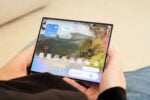
Compared to other foldable phones, the Galaxy Z Fold 8 arguably offers the most comfortable multi-window experience, primarily because the multi-window a.k.a. split-screen feature lends itself perfectly to the emerging passport-style form factor.
And yet, with just one tweak in One UI, you can make multi-window on the Galaxy Z Fold 8 even better.
By default, One UI's status and navigation bars are always visible when you use split-screen on the Galaxy Z Fold 8 and, indeed, on other Samsung phones, whether slab-type or foldable.
Thankfully, you can set your Galaxy Z Fold 8 (or other Galaxy phone) to hide these bars whenever you use split-screen.
Doing so will give you more screen real estate for your multi-window apps. And when you want to bring up the status and nav bars, all you need is to swipe up from the bottom of the screen or down from the top.
To try this feature on your Galaxy Z Fold 8:
Mihai Matei / SamMobile
Full screen in multi-window setting
Thanks to Android's responsive UI capabilities, app windows can be resized to almost any shape and size. UIs adapt on the fly. This works perfectly with multi-window, and if you hide the status and navigation bars while using split-screen on the Galaxy Z Fold 8, your apps' UIs will have more room to unfurl and look better.
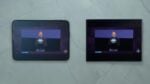
It actually makes a difference, especially if use the chunky navigation bar instead of navigation gestures. Hiding it in multi-window allows the app's ui to breathe. Below is a side-by-side comparison.
Mihai Matei / SamMobile
Galaxy Z Fold 8 multi-window with visible bars
Mihai Matei / SamMobile
Galaxy Z Fold 8 multi-window with hidden bars
This is one of the main advantages the Galaxy Z Fold 8 and One UI have over the iPhone Duo and iOS. The latter also offers multi-window, but iOS can resize apps based only on a pre-set list of resolutions. Therefore, iOS doesn't allow resizing of multi-window at all.
In contrast, Samsung leveraged the power of Android's reactive UI to give Galaxy Z Fold users additional options for an even better multi-window experience.
If you have a Galaxy Z Fold 8 and you're already enjoying multi-window, make sure to give this One UI tweak a try. You might end up liking it even more.