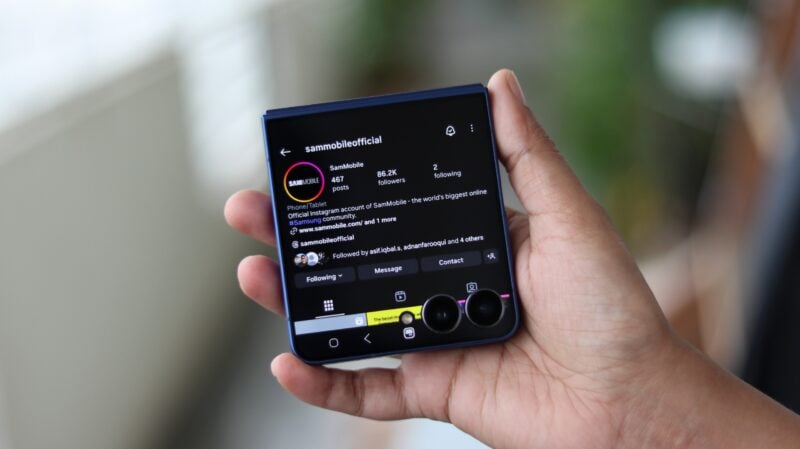
Samsung's Galaxy Z Flip series has quickly become an iconic part of the company's lineup. While last year's refresh left a lot to be desired, it was expected that the company would shake things up this year, and the Galaxy Z Flip 7 certainly does.
What's easy to love about this new device is that Samsung has been very mindful about the changes it has introduced, addressing most of the consumer demands while still keeping one or two in the tank for future models, such as the elusive telephoto camera.
You'll join me in being most excited about the new larger cover display as well as the larger and wider internal foldable display. This change completely transforms the ownership experience of Samsung's flip foldable in more ways than one.
There will understandably be some concern about the device's performance as this is the first Galaxy Z device to feature a Samsung Exynos chipset instead of the usual Qualcomm Snapdragon silicon. So let's dive into our Galaxy Z Flip 7 review and answer your most burning questions.
Design
The Galaxy Z Flip 7’s standout design feature is apparent the moment you pick it up: the new 4.1-inch edge-to-edge cover screen. It stretches across the front with minimal bezels, making a stylish first impression.
Beyond that, the overall design hasn’t changed much compared to previous models. The phone is slightly thinner than the Flip 6, but the difference isn’t drastic.
The Galaxy Z Flip 7’s standout design feature is apparent the moment you pick it up: the new 4.1-inch edge-to-edge cover screen.
That’s not to say it feels outdated. This is a highly premium device, offering the sleek build quality Samsung’s Galaxy Z Flip phones are known for, all while folding down to a size that fits easily in smaller pockets. There’s no titanium frame, but considering the Galaxy Z Fold 7 also skips that feature, that’s not entirely unexpected.
Like all of Samsung’s foldables, the Flip 7 supports Flex Mode, meaning it can stay unfolded at various angles. That's great for hands-free photos and video calls and video viewing. But it also makes the hinge stiffer, which means you’ll need both hands to open the phone unless you're willing to apply a lot of force.
Like all of Samsung’s foldables, the Flip 7 supports Flex Mode, meaning it can stay unfolded at various angles.
Folding it shut, on the other hand, is easy. In fact, you can even hold the bottom half and flick the upper half closed with a quick forward motion. Not that I would recommend doing that often. But thanks to the larger cover screen, you probably won't be unfolding and folding this phone all that much anyway. More on that later in the review.
The Flip 7 carries an IP48 rating, just like the Flip 6. That means it’s fully protected against water but only guarded against solid objects larger than 1mm, not dust. There’s still a small visible gap when the phone is folded, which could pose a risk to the inner screen if something like a pin slips in. But chances of that happening are low as the gap is very small.
Lastly, I love the blue color Samsung is offering this year. Samsung's using the same shade for bot the Flip 7 and Fold 7, and it looks fantastic. It’s classy without being dull, and it gives the phone a more premium and luxurious appearance.
Cover display
The cover screen is undoubtedly the star of the show on the Flip 7. It's bigger and way more useful than before. The larger size means there's more room for UI elements like buttons and text. Whether you're checking notifications, using widgets, or even full apps, everything feels more spacious and easier to interact with.
The cover screen is undoubtedly the star of the show on the Flip 7. It's bigger and way more useful than before.
I used the cover screen a lot. Like, a lot. The increase in size is a very welcome change, and not just for usability. It will indirectly help with durability as well, as you no longer have to unfold the phone every time you want to reply to a message or check an app. In fact, many apps work surprisingly well on the outer display even though Samsung doesn't officially support them (you can force full apps to run using Samsung's Good Lock app).
One big reason I found myself using the cover screen more is the 120Hz refresh rate. High refresh rate displays are a standard on smartphones these days, so the 60Hz panel on previous Flips felt out of place and suitable only for basic stuff like checking notifications. Now, you get the same smooth experience on both the inner and outer displays, which is great.
Typing is also noticeably better. With more space between letters, typing is more accurate, and there's enough screen estate for easy two-handed typing. I even found Samsung Keyboard's swipe typing to be more precise on the cover screen – I generally find it to be quite poor on regular phone displays. Speaking of Samsung Keyboard, that's the only option on the cover screen – you can't switch to other keyboard apps.
Samsung doesn't allow full apps to run on the cover screen by default. But you can use all the widgets that are available on the main display. They all adapt perfectly to the cover screen and the cameras never get in the way of the UI. One interesting new feature on the cover screen is Now Brief, Samsung's AI-powered briefing tool which gives you personalized updates about the weather, calendar events, commutes, fitness, your average daily screen times, news, and more.
You also get Google Gemini support on the cover screen, and it works surprisingly well.
You also get Google Gemini support on the cover screen, and it works surprisingly well. You can talk to it, ask questions, and even use Live mode to have a voice conversation with the assistant. And yes, all of that happens right on the outer display, no need to open the phone. It’s just as capable here as it is on the main screen.
Samsung has also add neat little animations in the camera app that take advantage of the cover screen area next to the cameras. When you start video recording, the area around the camera lenses lights up in red. If you use the timer, the screen next to the camera lenses is used for the progress bar and countdown.
Now, when you run unsupported apps through Good Lock, the dual cameras on the cover screen can block some of the UI. But Samsung has a smart fix for that. There's a handy aspect ratio toggle that shrinks apps on the cover screen to avoid the cameras. You can even rotate the app to portrait mode. I didn't find much use for that option, but it's there if you need it.
Foldable display
The Galaxy Z Flip 6 brought a big jump in brightness but left other aspects of the main screen unchanged. With the Flip 7, Samsung has upgraded the display to a 6.9-inch AMOLED panel, up from 6.7 inches on previous models. It's still got the same 120Hz refresh rate and a peak brightness of 2,600 nits, which makes it easy to see what's on the screen in all lighting conditions.
The display isn't just larger. The Flip 7's foldable display is wider, too, which makes it feel closer to a regular smartphone. Older Flip models had narrow and tall displays, which made on-screen content look a bit cramped. With a wider screen, that is no longer a problem. This is especially noticeable in YouTube. The extra width means less of the video gets cut off when you zoom in to fill the screen.
Quality-wise, you get the classic Samsung experience. Colors look great and everything is sharp. The display is tuned to be more natural out of the box, but if you prefer punchier colors, you can tweak the tone and vividness in the settings. There's also the adaptive color tone feature that automatically adjusts the white balance and overall color profile based on your surroundings.
As mentioned earlier, you can unfold the phone at different angles thanks to Flex Mode. When you fold the phone halfway, apps like Gallery and YouTube automatically move the photo or video to the top half of the screen, while the bottom becomes a control panel or touchpad. You can turn Flex Mode off, but I don't see why you would. Flex Mode is great, especially as a replacement for a kickstand when capturing photos or watching YouTube videos, and I used it often.
As for the crease, it's still there. You’ll feel it when your finger runs across the middle of the screen. And while it’s not always easy to see, it definitely shows up when the light hits it just right. If you were hoping Samsung made the crease disappear this year, disappointment awaits you.
Camera
The Galaxy Z Flip 7 comes with a 50MP main camera, a 12MP ultrawide camera, and a 10MP selfie camera embedded in the foldable display. There’s no dedicated zoom camera, which might be a dealbreaker for anyone looking for a truly versatile camera setup.
Still, the overall camera experience is solid, even if not quite on the same level as other flagship Galaxy smartphones. The 50MP main sensor takes 12MP photos by default, and the results are excellent in daylight. There's plenty of detail, dynamic range is impressive, and colors are accurate without being overly saturated. Samsung has also toned down the sharpening this year, so things like text and fine lines look cleaner and less jagged compared to the Flip 6.
Note: Some images mention AI-generated content because unnecessary objects were removed using the Galaxy AI object eraser. The images aren't altered in any other way.
You can shoot at the full 50MP resolution if you want, and while that does bring out a bit more detail in landscape shots, the real benefit is near-lossless 2x zoom. The 12MP mode also handles 2x zoom decently, but if you want the best results, it’s worth switching to 50MP mode.
Low-light performance is a bit of a mixed bag. The main camera holds onto detail pretty well, but noise can creep in. Night mode helps clean things up and slightly boosts detail retention, and it does a good job handling bright light sources without blowing them out.
The ultrawide camera is solid during the day, with a decent dynamic range and detail preservation. But it's not very useful at night. There's also no autofocus here, so unlike the ultrawide cameras on Samsung’s Galaxy S Ultra smartphones and the Fold 7, you can’t use it for close-up macro shots.
As for the front-facing camera, the 10MP one inside the main display, my advice is to ignore it. Instead, fold the phone and use the 50MP main camera with the cover screen as a viewfinder. The difference in quality between the front and rear cameras is massive. You get much better color reproduction and more detail, though sometimes pictures can be a little washed out.
The main camera also gives you better low-light selfies, especially when Night mode kicks in. All these benefits are also applicable to Portrait mode. Just be aware that Night mode can sometimes overexpose the face, something I hope Samsung can fix with a software update.
The Galaxy Z Flip 7 can record 4K videos with all cameras, and quality is pretty good overall, at least with the main camera. Like the Galaxy S25 series, videos are recorded in 10-bit HDR by default and HDR10+ can be enabled from Samsung's Camera Assistant app.
Samsung is still excluding 8K recording support from the Galaxy Z Flip series, which is a good thing considering that camera use—video recording in particular—is what made the phone heat up the most in my testing. However, like other Galaxy flagships launched this year, the Flip 7 does support log video recording.
The Galaxy Z Flip 7 marks a bit of a milestone: it’s the first Samsung foldable to use an Exynos chip. In fact, it’s also the first time in years that Samsung has launched a brand new Exynos processor in a flagship device that isn't part of the Galaxy S series.
The Exynos 2400, used in the Galaxy S24 series last year, was a solid chip, even if it didn’t quite match the Snapdragon 8 Gen 3 in every area. But Exynos has had an inconsistent track record over the years, so I was skeptical going in. That said, I’m happy to report that the Flip 7 performs really well. It’s fast, smooth, and handles pretty much anything you throw at it with ease, including intensive Galaxy AI functions like generative edit in images.
Samsung clearly feels confident about the Exynos 2500 — for the first time ever, a Galaxy Z Flip supports DeX.
Samsung clearly feels confident about the Exynos 2500 – for the first time ever, a Galaxy Z Flip supports DeX, a feature that lets you use your phone with a desktop interface on external displays and TVs. Older Flip models didn’t get DeX because the phones were too small to manage the heat that comes with a desktop-style user interface. The fact that it’s here now suggests Samsung trusts the new chip—and the cooling setup—to handle the pressure without melting down.
That said, cooling still has its limits because of the form factor and the thinner design. The Flip 7 generally does a decent job staying cool, and I was surprised to find that gaming sessions didn’t always push temperatures too far while extended camera use did. But some heavier games will heat up the phone considerably, resulting in the chip throttling performance, and much faster than conventional phones at that.
As always with Exynos chips, some games may not offer all the fancy graphical tricks from day one. While the AMD Radeon-powered Xclipse GPU inside the Exynos 2500 is no slouch, Snapdragon chips are far more widely used and better supported by game developers. For example, Asphalt 9: Legends supports 120 fps gameplay on both this and last year's Snapdragon chips. On the Flip 7, you're limited to 80 fps.
Software
The Galaxy Z Flip 7 ships with One UI 8 and Android 16 out of the box, making it one of the very few Galaxy devices on the market right now that offers the latest software experience from both Samsung and Google. Samsung has promised seven years of Android OS upgrades for the Galaxy Z Flip 7 and as many years of security updates.
There are a couple of headline changes this year. Samsung's DeX is finally available on a Galaxy Z Flip device. It works the same way on any other eligible device, both wired and wireless. You can access a desktop-style user interface with the device hooked up to an external display. It's nice to see that the user experience is right up there with other Samsung flagships.
One UI 8 represents a minor refinement over One UI 7 which brought significant UI changes. However, there are some new additions to Samsung's software. For example, additional camera controls are shown on the Galaxy Z Flip 7's cover display that make it much easier to take better selfies. Now Bar has been improved with new features while Routines have been further enhanced.
I enjoyed having ease of access to many AI features right from the cover display.
I particularly enjoyed having ease of access to many AI features right from the cover display. Gemini, Now Brief, and Gemini Live make it effortless to access the Galaxy Z Flip 7's AI capabilities. The device's Flex Mode becomes particularly useful as you can unfold it half way, set it on a flat surface, and have Gemini Live tap into the live feed from the camera to help you pick the perfect outfit.
Galaxy AI is central to Samsung's marketing push for its flagship phones now. The Galaxy Z Flip 7 doesn't disappoint in the number of AI features that it offers, perhaps even more than what you'll have use for. Most have them have been around on Samsung phones since early 2024.
Having run through them all on the phone, I'm happy to note that they work as expected. There was no noticeable difference in the performance or quality of AI output on the Galaxy Z Flip 7 despite the silicon change, so it can be every bit the AI workhorse you want it to be.
Audio, Connectivity
The Galaxy Z Flip 7 comes with the usual stereo speaker setup that's been seen on Samsung's flagship phones since 2019, with one dedicated speaker and the earpiece acting as the second channel. However, the Flip 7's speakers sound cleaner and slightly louder than those on the Galaxy Z Flip 6. This is as good as it gets on a Samsung phone that isn't a Galaxy S Ultra or a Galaxy Z Fold, with the latter sporting two dedicated speakers, and it's good to see the thinner design hasn't reduced audio quality.
The Flip 7 also boasts improved connectivity. It supports Wi-Fi 7 and Bluetooth version 5.4, whereas the Flip 6 features Wi-Fi 6e and Bluetooth 5.4. The rest of the connectivity package remains the same, with GPS, NFC, and a USB Type-C port. Like previous models, the Flip 7 offers a single physical SIM slot and an eSIM.
Battery life
It’s not often Samsung upgrades battery capacity two years in a row, but that’s exactly what’s happened here. After jumping to a 4,000 mAh battery on the Flip 6, the Flip 7 bumps things up again to 4,300 mAh. That's just 100 mAh short of the Fold 7, which is impressive for a clamshell (though you could also say the Fold 7's battery capacity is underwhelming if you have glass-half-empty goggles on).
Battery life isn’t massively better, but there’s a clear improvement, especially during intensive tasks. In a split-screen test where I recorded a 4K video and ran a YouTube video for half an hour, the Flip 7 lost 8% battery while the Flip 6 dropped by 14%. Real world endurance is better as well — things like gaming, video recording, and browsing on mobile data don't drain the Flip 7 as quickly.
I spent a lot of time on 5G during my testing owing to my mom being in the hospital, and despite that, the Flip 7 held up well. With 30-60 minutes of gaming, an hour of Amazon Music, YouTube streaming, and a few photos mixed in, I still had 11% left after 20 hours and a screen on time of 4h 11m.
On Wi-Fi, I managed around six hours of screen time and a full day of use. Total usage can drop down to 14-16 hours if the screen on time crosses six hours, which is still pretty solid. The Flip 6 couldn't last so long with the same kind of usage, at least not when a lot of cellular data was involved. The Flip 7's the first Flip with endurance similar to a regular phone, and that's great.
Verdict
The Galaxy Z Flip 7 is hands down the most polished and complete Flip Samsung has made so far. The bigger cover screen makes a huge difference in everyday use, in addition to making the stylish Galaxy Z Flip design look even better.
Battery life is finally like a regular phone, making this the first Flip you can rely on all day long. Samsung's decision to switch to an Exynos chip worked out better than expected, and we also finally get DeX support on the Flip series.
Sure, it isn't perfect, especially if you're looking for a camera setup that matches those of candybar flagships like the Galaxy S25. But Samsung has seriously cut down on the compromises this year, and if the higher price tag doesn’t bother you, the Flip 7 is an incredibly easy phone to recommend.
Galaxy Z Flip 7
What we like
- Stunning edge-to-edge 120Hz cover display
- Cover display runs various apps quite well
- Thinner, more stylish than any Flip before it
- Bigger, wider foldable display
- All-day battery life
- One UI 8/Android 16 out of the box, supports Samsung DeX
- Full Galaxy AI experience, Gemini support on cover screen
- Good cameras
- Fantastic performance, good cooling for the form factor
- Seven years of OS and security updates
What we don't
- No zoom camera
- Doesn't run as cool as other Galaxy flagships
- Needs Good Lock app to enable apps on cover screen
- Charges slower with third-party chargers

 Samsung Galaxy XR review
 Samsung Galaxy Watch 8 review
 Samsung Bespoke AI Jet Ultra review
 Samsung Galaxy Z Fold 7 review
 Samsung Galaxy Z Flip 7 review
 Samsung Galaxy S25 Edge review
 Samsung S95F OLED TV review
 Samsung Q7F QLED TV review: A no-brainer purchase at its low price
 Samsung S90F OLED TV review: Unreal value for money