Last updated: November 16th, 2021 at 10:59 UTC+01:00
SamMobile has affiliate and sponsored partnerships, we may earn a commission.
Reading time: 2 minutes
Smartphone makers know that which is why they've been catering to this need with improved selfie cameras and features. It's not just the best Samsung phones that let you take great selfies. However, there is one feature that you'd want to turn off.
Fire up the camera app on your phone and open the settings menu. You'll see a feature called Save selfies as previewed enabled by default. What it does is save selfies exactly how you see them on the phone without flipping them.
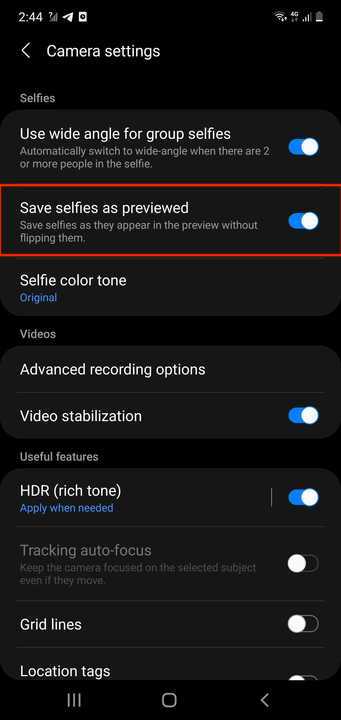
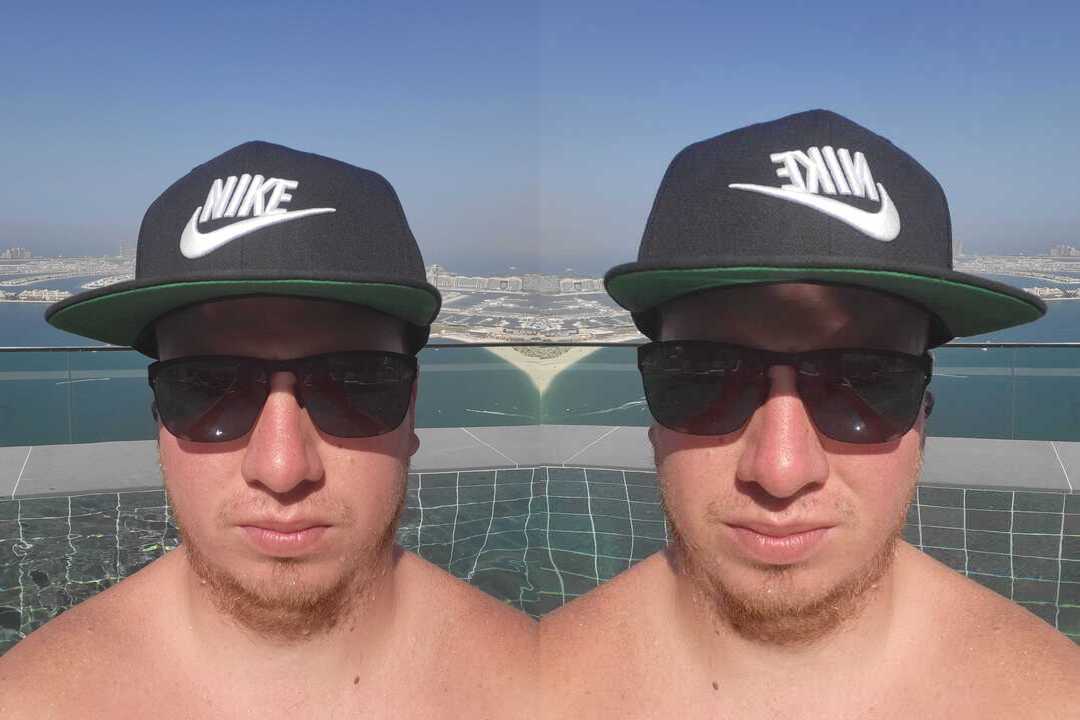
A lot of people don't know that this feature is enabled by default. So, for example, if they're wearing a hat and they take a selfie, any letters and designs on the hat will be flipped. You can see an example in the photo below.
The image on the left was taken with the feature disabled. You can see that the logo and lettering are not flipped. However, when the feature is enabled, they're flipped.
So if you tend to wear a lot of hats then you should definitely keep this feature disabled. If you don't then perhaps this doesn't really matter to you.
Join SamMobile’s Telegram group and subscribe to our YouTube channel to get instant news updates and in-depth reviews of Samsung devices. You can also subscribe to get updates from us on Google News.

Adnan Farooqui is a long-term writer at SamMobile. Based in Pakistan, his interests include technology, finance, Swiss watches and Formula 1. His tendency to write long posts betrays his inclination to being a man of few words.













