HAPPY HOLIDAYS – SamMobile. Awesome deals Galaxy Z Fold7, Watch8, S25 Ultra and S95F OLED TV
Last updated: April 13th, 2023 at 09:52 UTC+02:00
SamMobile has affiliate and sponsored partnerships, we may earn a commission.
Reading time: 2 minutes
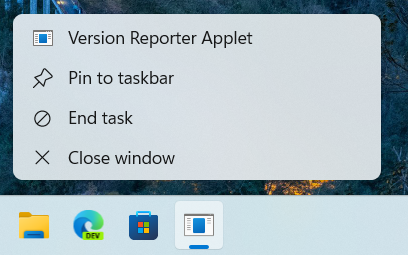
Notably, users will be able to quit unresponsive apps or tasks with a click of a button. The new feature, dubbed ‘End Task,' was spotted in the latest Dev Channel version of Windows 11. Users can easily turn on or turn off this Windows 11 ‘End Task' feature as per their choice. As noted by Tom's Guide, in order to activate this feature, Windows 11 users need to go to the ‘Settings' menu and select the ‘For Developers' menu from the ‘Privacy and Security' option.
This will give Windows 11 users the ‘End Task' option to kill unresponsive tasks from the taskbar itself rather than having to open the Task Manager first and find that unresponsive app. This feature could be a part of Windows 11, as it is currently hidden within the latest Windows 11 build in the Windows Insider Channel build 25300. However, thanks to a popular tipster that goes by the name @PhantomOfEarth on Twitter, we have a screenshot of how this Windows 11 will look ‘End Task' feature on the taskbar once it rolls out.
Up until now, in order to close the unresponsive tasks on Windows 11, users needed to open the Taskbar, enter the Taskbar settings, choose the running tasks, and close them forcibly. This process took a long time, which is why Microsoft is considering providing a one-click solution to kill unresponsive tasks. You can soon use this feature on your Galaxy Book laptop running Windows 11.