HAPPY HOLIDAYS – SamMobile. Awesome deals Galaxy Z Fold7, Watch8, S25 Ultra and S95F OLED TV
Last updated: September 22nd, 2021 at 13:50 UTC+02:00
SamMobile has affiliate and sponsored partnerships, we may earn a commission.
Reading time: 2 minutes
Do you have an alarm on your phone that is set to go off at the same time every day? Have you ever been in a situation where you didn't want that alarm to go off on a particular day? Before One UI 4.0, you would have to manually enter the alarm settings in the Clock app, turn it off on the day you didn't need it, then turn it back on again so you could get back to your usual routine.
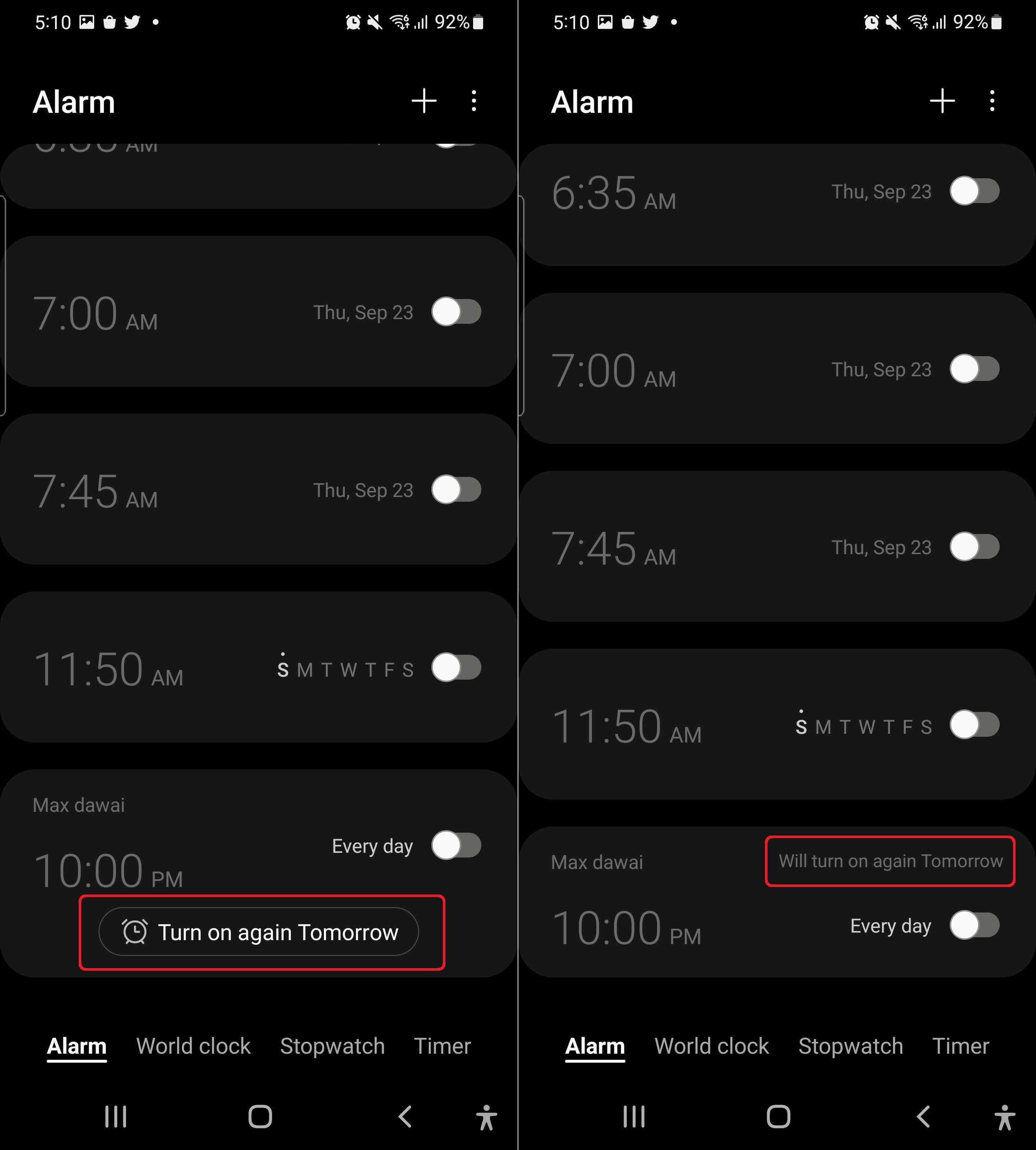
On One UI 4.0, Samsung has made that process much simpler: Every time you disable an alarm that's set to go off every day or on a particular day every week, the app will ask you if the alarm should be automatically enabled the next day or week so you don't have to make the trip back into the Clock app to do it yourself.
It's one of those nice little features that can make a sizeable difference in your day-to-day life. One UI 4.0 may be lacking in big new functionality, but it has many small changes and improvements littered throughout that further enhance the user experience, and this is just one example.
For more, check out the video below, and let us know what One UI 4.0 features you like down in the comments. And don't forget to join the SamMobile Telegram channel to stay on top of all the latest news, reviews, firmware updates, giveaways, and more and to interact with our ever-growing community.
Abhijeet's writing career started with guides for custom firmware for Samsung devices (including the original Galaxy S), and he moved to SamMobile in mid-2013 and worked up the ranks to Editor-in-chief. In addition to phones and mobile devices, his interests include gaming on both PC and console, PC hardware, and spending countless hours on YouTube watching videos on tech, movies, games, politics, and internet dramas.