


Last updated: November 9th, 2026 at 15:40 UTC+01:00


Here's an early look at One UI 9.5's Samsung Notes app!

Samsung is busy updating many of its apps for the One UI 9.5 update.

Abhijeet Mishra

Reading time: 1 minutes

Galaxy Tab S12 Ultra S Pen

Abhijeet Mishra / SamMobile

APK

Galaxy Tab S12 Ultra S Pen

TL;DR

  • Samsung is updating many of its apps for One UI 9.5, including a redesigned Samsung Notes app.
  • Early screenshots show a number of changes, but details are still limited.
  • The story is developing, so more information may be added later.

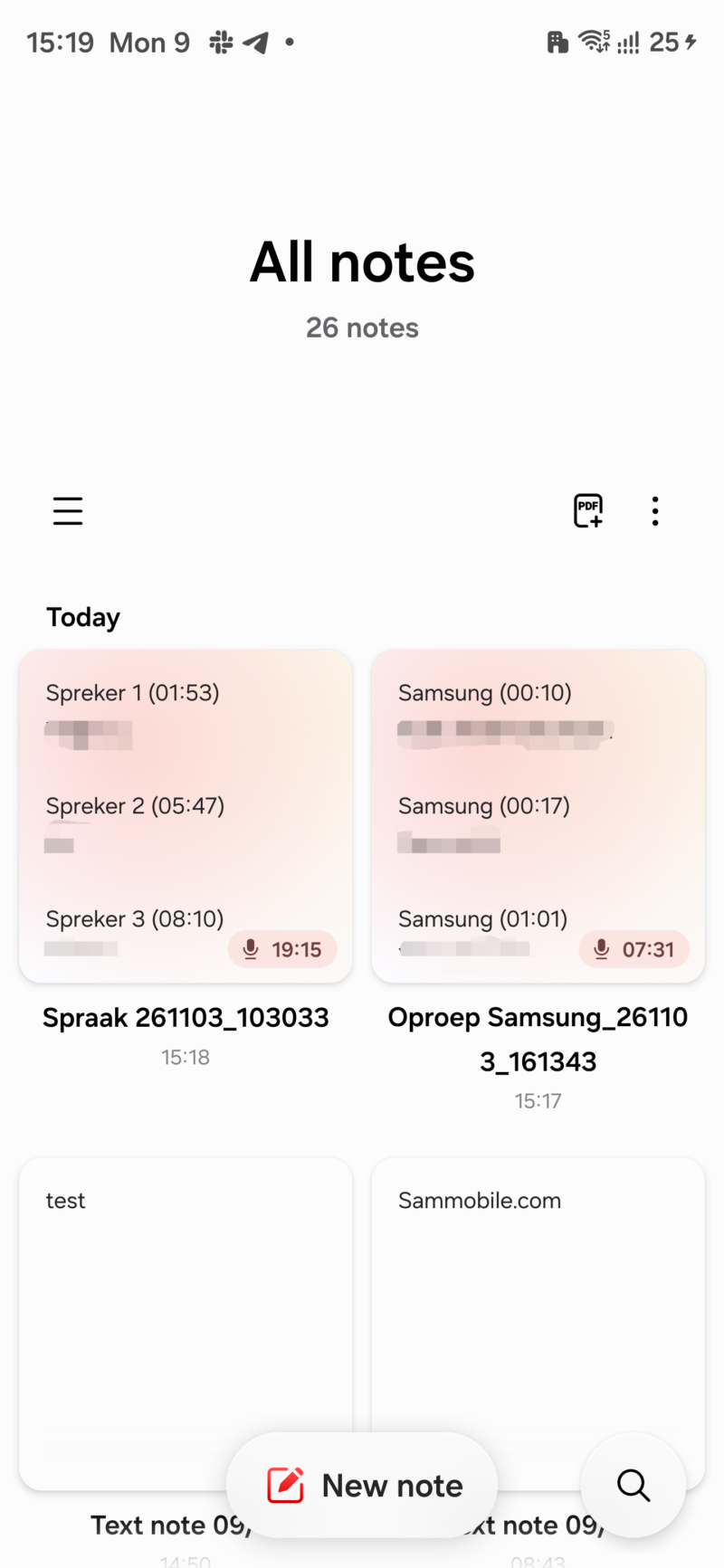
Samsung is busy updating many of its apps for the One UI 9.5 update, and we have now gotten access to the company's new Notes app. As you can see in the screenshots below, there are a number of changes that Samsung is bringing to the app.

The location of the New Note button has changed from the bottom right corner of the screen to the bottom middle. The Search button has changed its position from the top right corner to the bottom right corner.

Samsung Notes: One UI 9.5

Abhijeet Mishra / SamMobile

Samsung Notes: One UI 9.5

Samsung Notes: One UI 9.5

Abhijeet Mishra / SamMobile

Samsung Notes: One UI 9.5

The app also shows a subtle color glow as the background for thumbnails of each note. Moreover, it automatically hides sensitive information inside notes to be visible in that note's thumbnail.

Samsung Notes: One UI 9.5

Abhijeet Mishra / SamMobile

Samsung Notes: One UI 9.5

Samsung Notes: One UI 9.5

Abhijeet Mishra / SamMobile

Samsung Notes: One UI 9.5

You can view the animation of the New Note button in the video below.

There is also a subtle animation to the text that appears in the search bar when you tap on the Search icon. You can see it in our short video below.