Cyber week deals! Galaxy Watch8 Classic, Fold 7, S25 Ultra. Follow us on YouTube, TikTok, or Instagram
Last updated: November 15th, 2017 at 01:15 UTC+01:00
SamMobile has affiliate and sponsored partnerships, we may earn a commission.
Reading time: 2 minutes
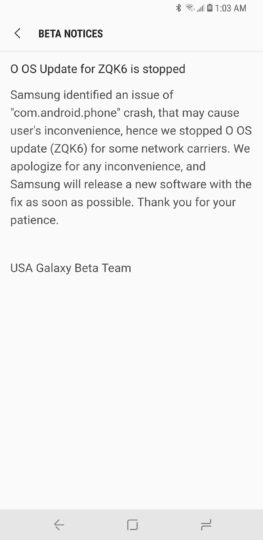
This issue affects Sprint, T-Mobile, and unlocked Galaxy S8s, with users complaining about the phone app repeatedly crashing after the update. Some of those users say clearing data for the phone app fixes the issue, but it crops right back after a restart. A factory reset isn't helping either, and that might be why Samsung isn't pushing out the update at this time. The company will hopefully find a solution quickly, but right now, there's no mention of when the update will start rolling out again.
With beta software, such issues are to be expected and the reason why it shouldn't be used as a daily driver. Thankfully, the network connectivity problem seems to be limited to the US models, so Samsung is still gathering information and working towards Android 8.0 Oreo's official release. Here's hoping the fix is a simple one and rolled out as quickly as possible, instead of being reserved for the third beta. We'll be sure to let you know either way, so stay tuned to SamMobile.
Oh, and for the temporary solution of clearing data for the phone app (which may or may not work for you), here's what you would need to do:
Have you faced this issue running the latest Android Oreo beta on your Galaxy S8 or Galaxy S8+?
Abhijeet's writing career started with guides for custom firmware for Samsung devices (including the original Galaxy S), and he moved to SamMobile in mid-2013 and worked up the ranks to Editor-in-chief. In addition to phones and mobile devices, his interests include gaming on both PC and console, PC hardware, and spending countless hours on YouTube watching videos on tech, movies, games, politics, and internet dramas.