6 days until XMAS. Massive discount Galaxy Z Fold7, Watch8, S25 Ultra and S95F OLED TV
Last updated: May 27th, 2015 at 11:34 UTC+02:00
SamMobile has affiliate and sponsored partnerships, we may earn a commission.
Reading time: 2 minutes
With Android 4.4 KitKat, Google simplified the procedure of selecting the default app for the home launcher and messaging, but didn't do anything to simplify the process of clearing a default for a particular function, which continues to hide in each app's specific details page in the applications settings. But Samsung thankfully stepped in by putting all these settings on a single page, something that is also available on the company's latest devices, the Galaxy S6 and Galaxy S6 edge.
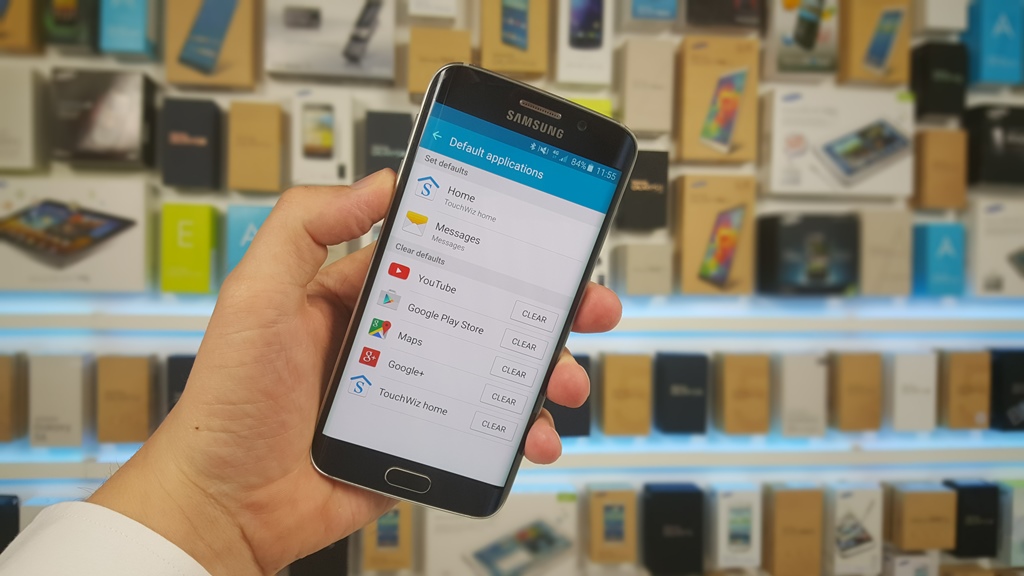
So how do you manage default apps for the home launcher and messaging, and how do you clear a default for a particular app? Here's how:
In this menu, you will see a section for setting home and messages defaults, and a list of all applications that are currently set as default for various things, such as browsing, video, gallery, and more. To clear a particular default, you simply need to press the Clear button. This will clear the default, and the next time you try to start up the relevant function, you will once get an option to select from all the apps that can be used for the same.
We should note that the ability to manage defaults from a single location is also available on all Samsung devices that come with Android 4.4 out of the box. The only difference is that on these devices, you will find this option in the main settings menu itself, listed as Default applications at the very bottom, but it otherwise in the same way as the procedure described above.
Abhijeet's writing career started with guides for custom firmware for Samsung devices (including the original Galaxy S), and he moved to SamMobile in mid-2013 and worked up the ranks to Editor-in-chief. In addition to phones and mobile devices, his interests include gaming on both PC and console, PC hardware, and spending countless hours on YouTube watching videos on tech, movies, games, politics, and internet dramas.