Last updated: June 19th, 2025 at 06:23 UTC+02:00
SamMobile has affiliate and sponsored partnerships, we may earn a commission.
Samsung has released an update to the Game Booster app to prepare it for One UI 8.0. It brings eight new features to the table.
Reading time: 5 minutes

Samsung has released a major update to the Game Booster app for Galaxy smartphones and tablets, most likely to prepare it for Android 16-based One UI 8.0. It carries version 7.0.51.13 and brings at least eight new features (via @GalaxyTechie).
Those include Dash Notifications, Game Controller, Game Sound with AI Mute, Max Boost, Respawn Timer, Super Microphone, Virtual Gamepad, Voice Changer, and 4D Vibration. Let’s take a look at what these features do.
After installing the latest version of Game Booster, when you open the app, it will show you a welcome message along with the ‘Max Boost’ option at the bottom. While Samsung hasn’t said what it does, we are assuming that it offers the maximum performance during gaming for a smoother gameplay. The brand warns “In some games, your phone could use more battery or get a little hotter than normal.”
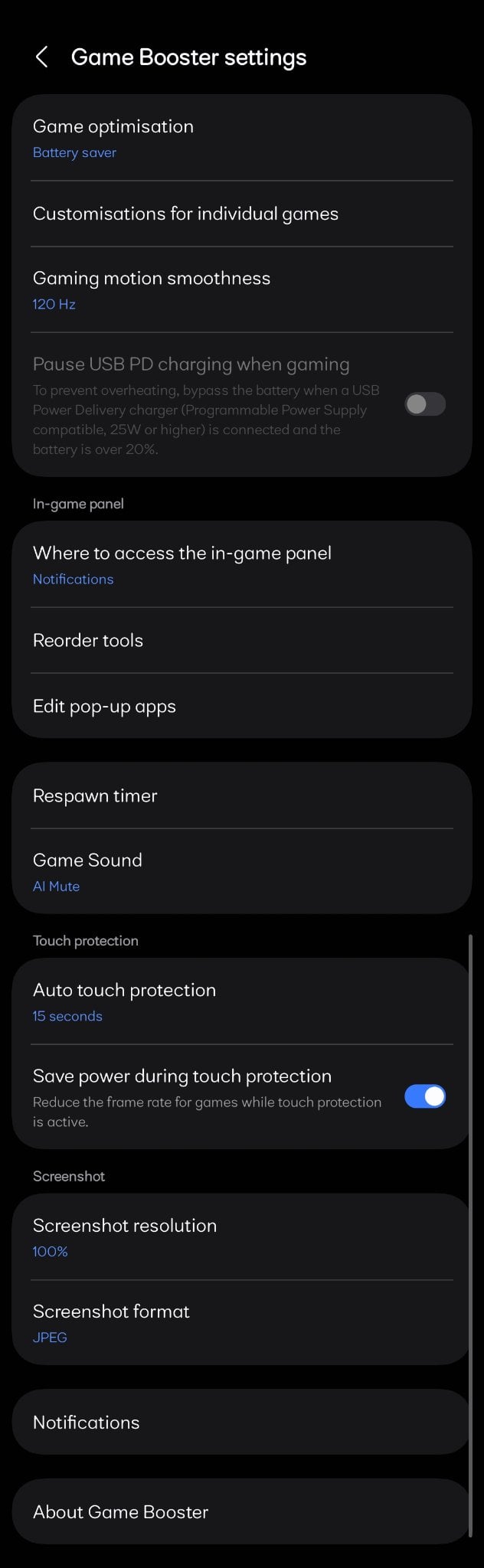
Once you pass the welcome screen, you will see all the Game Booster settings. Here, you will find two new options: ‘Respawn Timer‘ and ‘Game Sound.‘ The description for the former says “When waiting for your character to respawn, display a floating timer on your screen that lets you know when you can rejoin your game.” As for the latter, it offers ‘Sound,‘ ‘Mute,‘ and ‘AI Mute‘ options. While the first two are self explanatory, the third one is interesting.

Samsung says that AI Mute can “Identify the game screen, implement intelligent mute and volume recovery when you launch the game screen.” From what we could gather, when you are in a game but not playing it, such as when you are browsing a menu, the feature will recognise that (by analysing the content on the screen) and mute audio to avoid disturbances, and when you start playing the game, it will recognise that too and unmute the audio.

In the Reorder Tools section, you will find three new features: ‘Dash Notifications,‘ ‘Super Microphone,‘ and ‘Voice Changer.‘
The description for Dash Notifications says “Stay updated while you’re immersed in your game with notifications that disappear after crossing the screen.” When you are playing a game, if you receive a notification, this feature will put it in a semi-transparent container and make it pass from the right to the left edge of the screen. It does that in a short period of time so that you get the notification but it doesn't distract you.
The feature also gives you sliders for ‘Speed‘ and ‘Transparency.‘ The former lets you set how fast the notification moves from the right to the left edge of the screen, and the latter lets you adjust the transparency of the notification container.


As for Super Microphone, it offers two options: ‘Always Keep Mic Available In Game‘ and ‘Switch Bluetooth Mic On.‘

Along with playing game, if you are using any other application that is utilising the microphone, you may not be able to use microphone in the game. This is where the former comes in. Even if the other app is using the microphone, the feature will make the microphone available in the game as well.
As for Switch Bluetooth Mic On, if you are using a Bluetooth device for audio, which usually offer lower voice quality than the phone's in-built mic, this feature will improve the quality of voice coming from the mic.
Coming to Voice Changer, this feature can apply ten effects to your voice — Little Girl, Middle-Aged Man, Sci-Fi Horror, Ethereal, Warbling, Lo-Fi Landline, Baby, and Robot — allowing you to mask your actual voice in the game.
As for Game Controller, Virtual Gamepad, and 4D Vibration, while Samsung has mentioned them in the change log, we are yet to find these features in the app. Once we do, we will update you with what they do.

On our Galaxy S25 and Galaxy S25 Edge in India, when we checked the Galaxy Store for Game Booster update, we didn't see one. It suggests that Samsung has rolled out the update in only a few regions.
So, we side-loaded the the latest version of the app on our Galaxy S25 with One UI 7.0 to test the new features. We recommend you not to install apps downloaded from untrusted sources as they may contain malware.
When Samsung releases the update in your region, to get it, go to Galaxy Store » Menu » Updates.
Interestingly, on our Galaxy S25 Ultra running One UI 8.0 beta, there's an even newer version of Game Booster (version 8.0.00.15). However, it doesn't offer any of the new features that the version 7.0.51.13 does. So, for now, the version with the new features hasn't officially been released.

I’m a computer science engineer living in Hyderabad, India, who has a keen interest in automobiles and consumer electronics. My journalism career kicked off in 2017 with MySmartPrice where I wrote news, features, buying guides, and explanatory articles about technology among other things, and reviewed many products, including smartphones, tablets, laptops, PC components, smartwatches, audio devices, wearables, and smart home products. Since then, I have worked for 91Mobiles, Apple, and Onsitego, before finally landing on SamMobile.












