Last updated: June 24th, 2021 at 18:22 UTC+02:00
SamMobile has affiliate and sponsored partnerships, we may earn a commission.
Reading time: 2 minutes
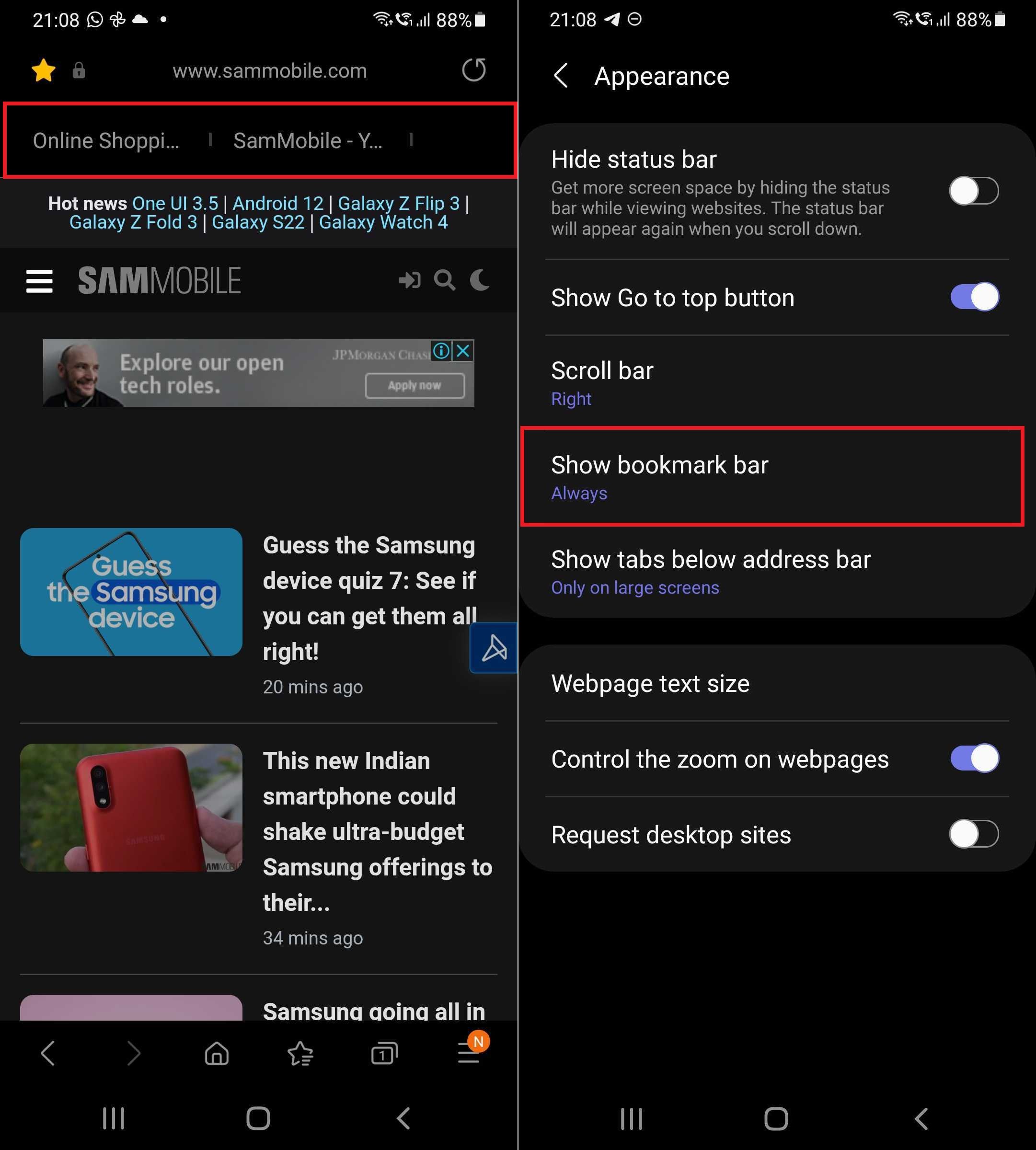
This feature is the option to add a persistent bookmark bar to the top of the browser, similar to bookmark bars seen in desktop browsers, so you can quickly open your favorite website with a single click. Naturally, given the limited screen estate on phones, the bookmark bar is better suited to tablets, but with the latest version of Samsung Internet, it's there if you need it no matter how big or small your mobile device may be.
To enable the bookmark bar, you need to go into the app's settings, navigate to Appearance, and tap the Show bookmark bar option and select Always. To remove it, just change that from Always to Never. Once enabled, you can add whichever website you may be browsing at the time to the bookmark bar by tapping the hamburger button (the three parallel lines), tapping Add page to (the button with the big plus sign), and selecting Bookmark bar.
The new Samsung Internet update also enhances the ‘continue apps on other devices' feature. For those who didn't know, Samsung Internet can sync tabs across different Galaxy devices signed in to the same Samsung account, and now, the syncing should extend to the exact page position. To view all synced tabs, you need to hit the tabs icon at the top right of the screen to view all open tabs, tap the More button (the three vertical dots), and select Synced tabs.
The latest Samsung Internet app (version 14.2.1.69) can be downloaded from the Galaxy Store or the Google Play Store. It's also available for manual download from our APK archives.

Abhijeet's writing career started with guides for custom firmware for Samsung devices (including the original Galaxy S), and he moved to SamMobile in mid-2013 and worked up the ranks to Editor-in-chief. In addition to phones and mobile devices, his interests include gaming on both PC and console, PC hardware, and spending countless hours on YouTube watching videos on tech, movies, games, politics, and internet dramas.












