Cyber week deals! Galaxy Watch8 Classic, Fold 7, S25 Ultra. Follow us on YouTube, TikTok, or LinkedIn
Last updated: July 10th, 2019 at 17:15 UTC+02:00
SamMobile has affiliate and sponsored partnerships, we may earn a commission.
Reading time: 2 minutes
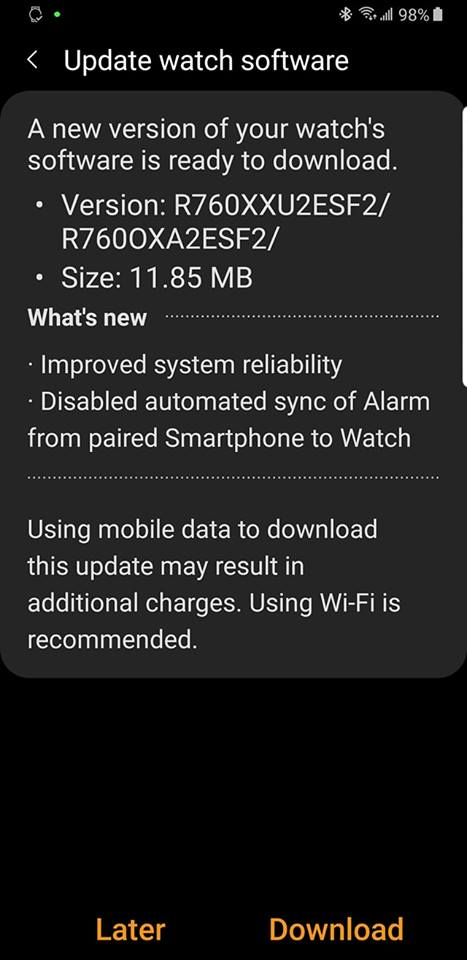
That's because after the One UI update, the Gear S3 has been forcefully copying the settings for a particular alarm from the phone, overriding any changes made to the alarm on the watch. For example, if you set the watch to only vibrate for your morning alarm and set the phone to vibrate and ring for the same alarm, you'll find the watch ringing as well when you wake up. After installing the update that's rolling out today, that should stop being an issue and your Gear S3 should remember your alarm preferences once again.
The new update is available for both the Frontier and Classic models and should show up as a notification on your phone at some point. You can also try and download the update right away by opening the Galaxy Wearable app on your phone, selecting About Watch, followed by Update watch software, and then tapping the Update now button. Since these updates are rolled out in stages, it will take some time before the update is available for everyone.
[modelinfo model=”SM-R760″]
[modelinfo model=”SM-R770″]
Abhijeet's writing career started with guides for custom firmware for Samsung devices (including the original Galaxy S), and he moved to SamMobile in mid-2013 and worked up the ranks to Editor-in-chief. In addition to phones and mobile devices, his interests include gaming on both PC and console, PC hardware, and spending countless hours on YouTube watching videos on tech, movies, games, politics, and internet dramas.