Last updated: March 17th, 2024 at 15:09 UTC+01:00
SamMobile has affiliate and sponsored partnerships, we may earn a commission.
Reading time: 2 minutes
Google has announced that Google Docs, Google Slides, and Google Sheets applications for Android now offer a sidebar containing formatting options on devices with large screens, such as tablets, which makes it easier for you to access formatting options.
The Docs, Slides, and Sheets apps for Android offer formatting options in a horizontal bar at the top of the screen. Since the bar is tiny and has to show many formatting options, it doesn’t show sub-options of a main option, which means that you have to tap multiple times on the screen to access a sub-option, which feels quite cumbersome.
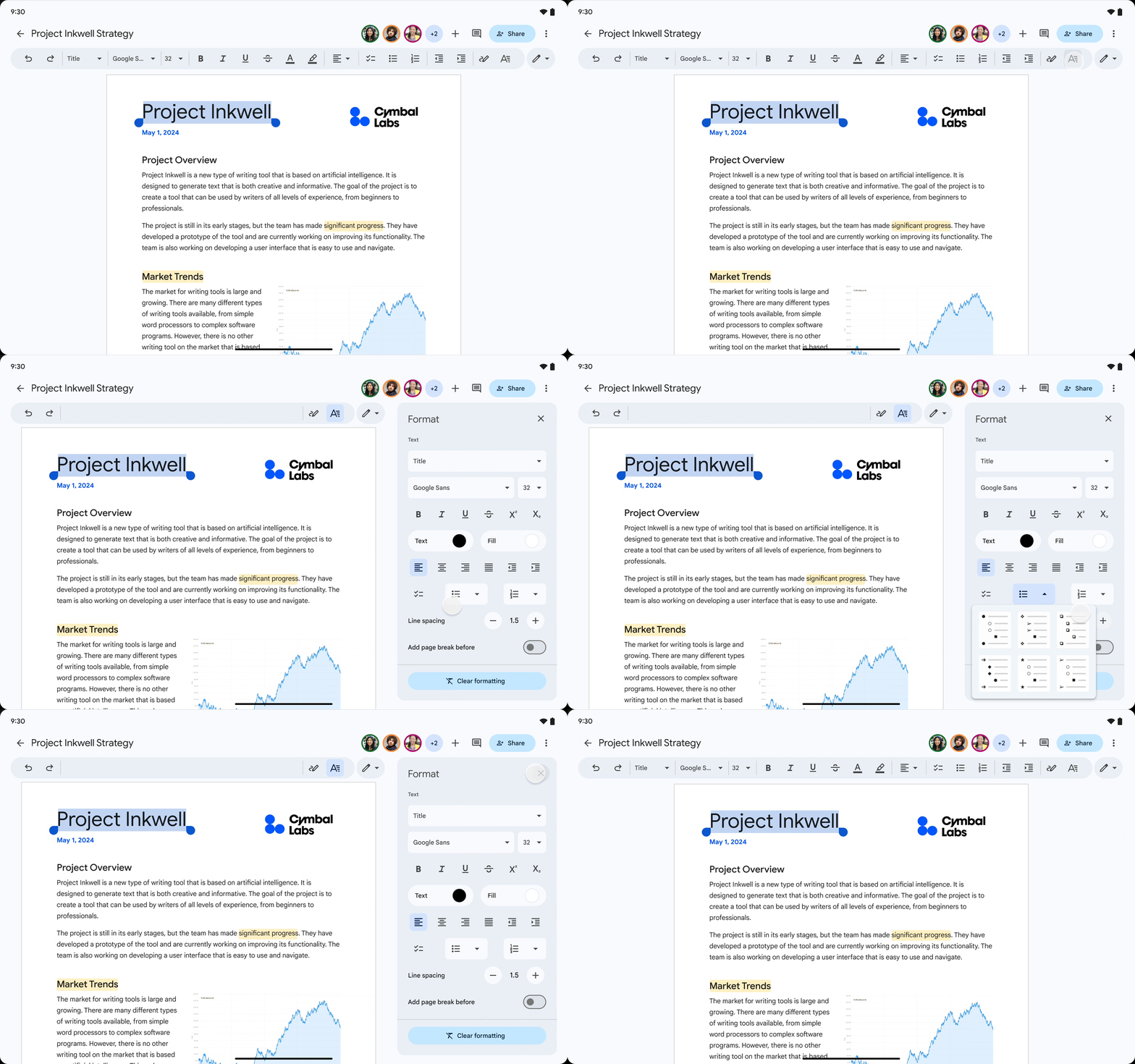
With the update, the bar at the top of the screen will show you an option called Format that will bring all the formatting options to a card on the right-hand side of the display. Since the card is spread across a much larger than the bar, formatting options appear more clearer and informative. Plus, the card also shows granular options all the time, which, according to Google, “reduces the number of taps needed to navigate to formatting options, enabling you to more easily arrange text, tables, images and more.”
With the formatting sidebar, the experience of using Docs, Slides, and Sheets on Android tablets feels similar to using those platforms on a desktop. Google has started rolling out the new feature with an update to the three apps. So, update them from the Play Store to get it on your Galaxy Tab. According to Google, the latest feature is available to “all Google Workspace customers, Google Workspace Individual subscribers, and users with personal Google accounts.”

I’m a computer science engineer living in Hyderabad, India, who has a keen interest in automobiles and consumer electronics. My journalism career kicked off in 2017 with MySmartPrice where I wrote news, features, buying guides, and explanatory articles about technology among other things, and reviewed many products, including smartphones, tablets, laptops, PC components, smartwatches, audio devices, wearables, and smart home products. Since then, I have worked for 91Mobiles, Apple, and Onsitego, before finally landing on SamMobile.














