Last updated: May 23rd, 2023 at 08:16 UTC+02:00
SamMobile has affiliate and sponsored partnerships, we may earn a commission.
Reading time: 2 minutes

Notably, there will be a new ‘Resize' shortcut inside the upcoming toolbar/panel redesign. Using the Gboard Resize shortcut, users will be able to adjust the height of the keys and the panel. All they would require is to drag up and down from the top or bottom edge of the Gboard keyboard.
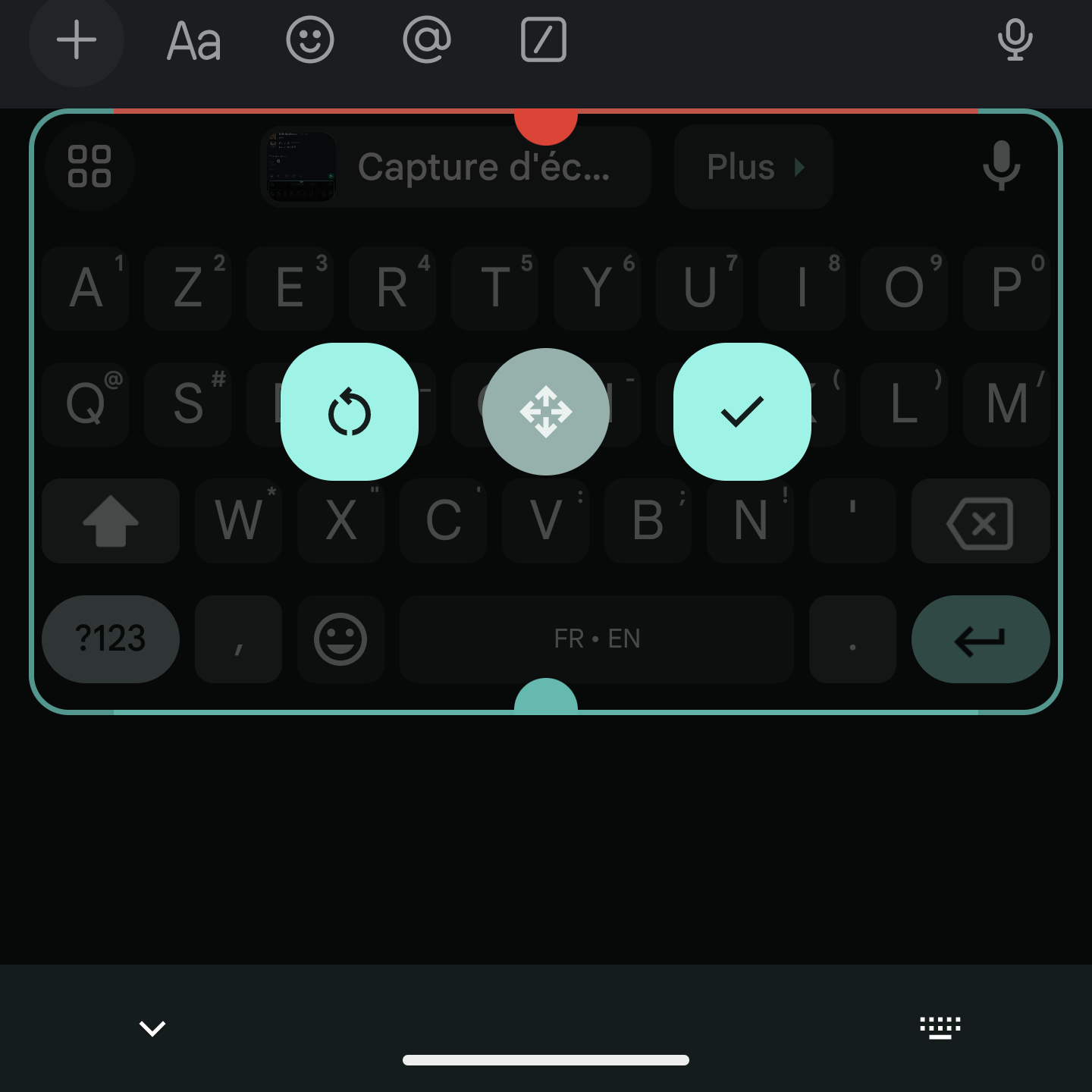

Do note that this keyboard resizing option is already available in Gboard Settings > Keyboard height. You can choose among seven options: Extra-short, Short, Mid-short, Normal, Mid-tall, Tall, and Extra-tall. However, being able to resize Gboard from the keyboard right from the toolbar using the ‘Resize' shortcut is an easier way.
A new feature with this upcoming Gboard ‘Resize' shortcut is that you can easily move the resized keyboard (using the center button) up the screen. This will give you some empty space between the bottom edge and the system status bar. The feature is somewhat similar to Samsung Keyboard's One-handed or Floating keyboard options.
The feature was enabled in Gboard v13.0, which also includes some new features, such as Tabletop mode for foldable smartphones like the Galaxy Z Fold 4. However, all these changes are yet to go live for the general audience.













