Last updated: March 26th, 2023 at 14:22 UTC+02:00
SamMobile has affiliate and sponsored partnerships, we may earn a commission.
Reading time: 2 minutes
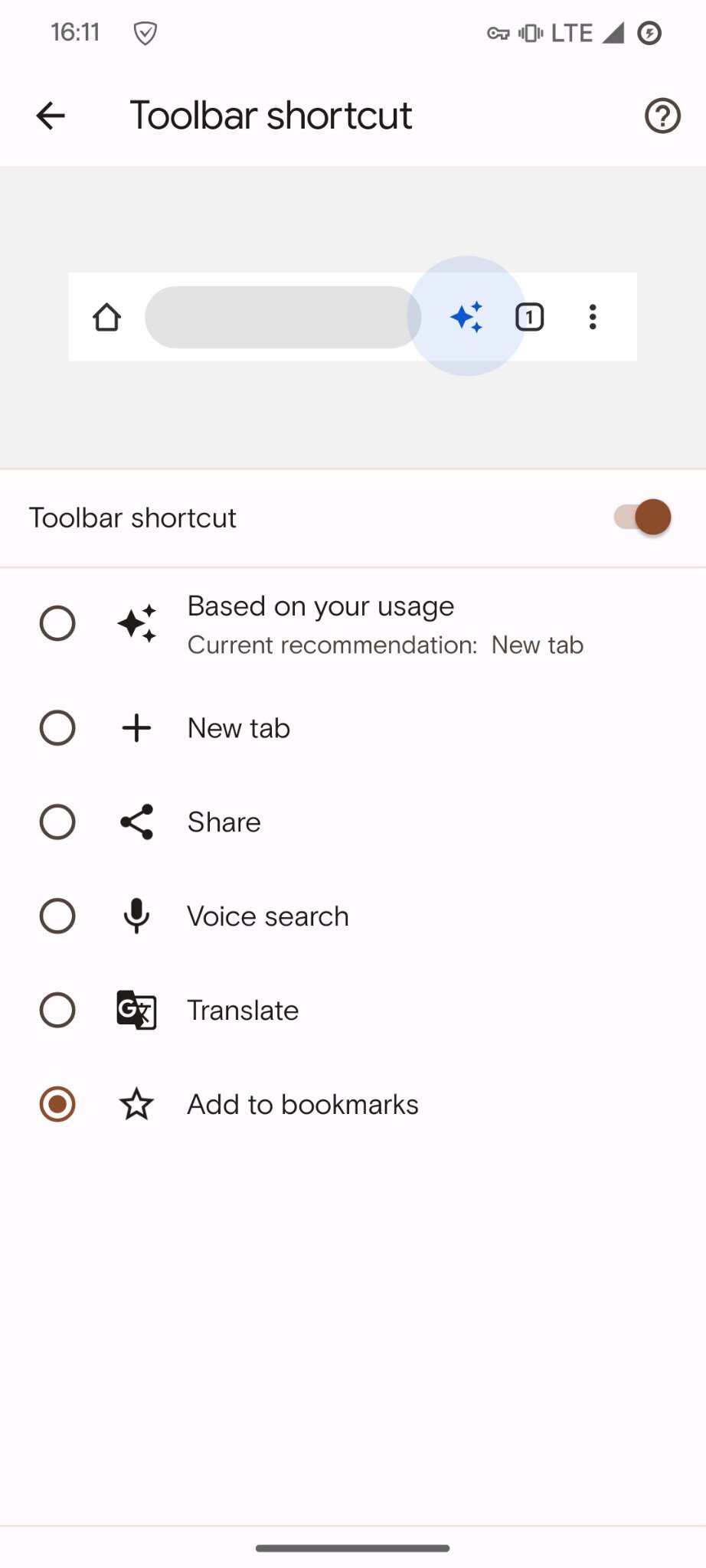
However, the Google Chrome toolbar shortcut did not reach its full potential since the functionality was limited. Now, some new features are getting added to this button in Chrome Canary. A bunch of new features has been spotted by AssembleDebug on Twitter. These new features give you the option of quickly bookmarking the current tab using Chrome's toolbar button, translating the page, opening a new tab, sharing the page, performing a voice search, and more.
In order to use the new features, you need to install Google Chrome Canary version 113 on Android. It is expected that the feature will make its way to the stable channel in the coming months. Even after installing the right version, you need to enable a few flags, such as chrome://flags/#adaptive-button-in-top-toolbar-add-to-bookmarks and chrome://flags/#adaptive-button-in-top-toolbar-translate.
After enabling the Google Chrome toolbar feature, you will find this option in Chrome's overflow menu, and head to Settings » Toolbar shortcut and make your selection on how you wish to operate these new features. You can choose to either always show the Google Translate or bookmark icon or use Google's algorithmic magic to show the most relevant button based on the page that you are viewing.