Last updated: October 7th, 2013 at 10:32 UTC+02:00
SamMobile has affiliate and sponsored partnerships, we may earn a commission.
Reading time: 2 minutes
The app will replace your default lockscreen, and imitates the lockscreen found on the Galaxy S4 quite well. You have the ripple and light effect for when you put your finger on the lockscreen (with each having its own set of options, such as ripple or blue rings for the light effect, ink color customization for the ripple effect), support for app shortcuts, custom fonts, and personal and carrier information as well.
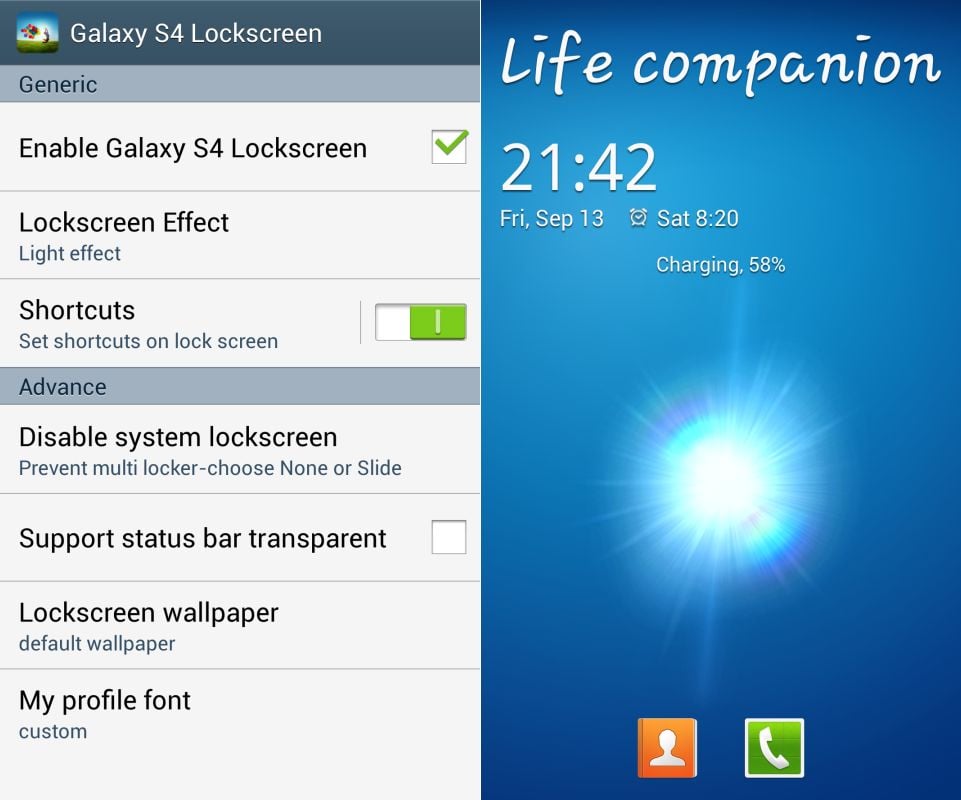
I tested the app on my Nexus 4, and it worked extremely well, with smooth animations without any hiccups. It's all a bit too flashy for me, and it also means having to give up lockscreen widgets, but if you've been clamoring for some of that ripple and bubble action, well, Galaxy S4 Lockscreen is an app you definitely want to take a look at.
Hit up the source link to download Galaxy S4 Lockscreen from the Play Store. It's free (supported by ads), and doesn't require root access.

Abhijeet's writing career started with guides for custom firmware for Samsung devices (including the original Galaxy S), and he moved to SamMobile in mid-2013 and worked up the ranks to Editor-in-chief. In addition to phones and mobile devices, his interests include gaming on both PC and console, PC hardware, and spending countless hours on YouTube watching videos on tech, movies, games, politics, and internet dramas.














